12  Forecasting and classification (mini chapter)

These two topics are not the same, but they are important topics for a young data scientist to at least be familiar with.

12.1 Classification

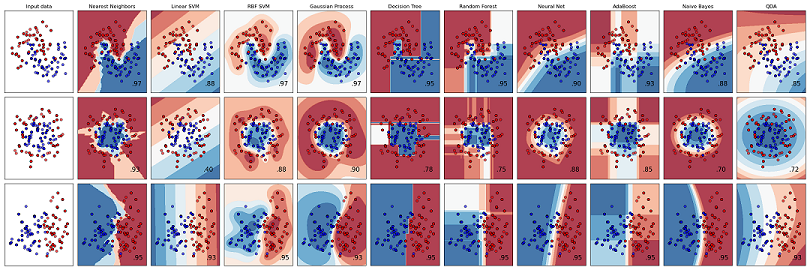
Scikit learn classifiers

Scikit learn classifiers

Understanding of classification is vital. Many tasks for the modern data science require some sort of classification. Some common approaches include classifying images (which we discussed in the convolutional neural network explanation), classifying whether or not a company will go bankrupt, or whether or not the Knicks will win the Eastern conference.

Two main approaches:

  1. “Deterministic” approach: An input always produces the same output.

    1. Something like Lichtman’s election forecast, which makes a classification based on 11 indicators, but provides no probabilistic inference. There is a formula Lichtman uses with no room for any random variation to enter the model.

    2. Some algorithm like k-nearest neighbors can be used for classification in a non-probabilistic way, though it can be modified to obtain probabilities of a class.

  2. Probabilistic classification: An input produces an output but with probabilities for the classes.

    The textbook “Gaussian processes for machine learning” (Williams and Rasmussen 2006) gives a nice explanation of this which we will follow in spirit.

    1. Generative approach (use Bayes rule): Recall, Bayes rule says \(\Pr(y\mid x)=\frac{\Pr(y)\Pr(x\mid y)}{\sum_{j=1}^{n}\Pr(x\mid y_j)\Pr(y_j)}\)

      This is called the “generative” approach. To see why, let’s consider the rules of probability. \[\Pr(x,y)=\Pr(y)\Pr(x\mid y)\]

      which is the numerator in Bayes rule! Then we can predict \(\Pr(y\mid x)\) using the Bayes rule approach.

      A common example of this approach is the “Naive Bayes” classifier, which assumes that \(X_i\) are indepenent given the output \(Y\), meaning the numerator of the Bayes rule example we wrote is now (assuming we have \(p\) features in \(X\))

      \[ \Pr(x,y)=\Pr(y)\Pr(x\mid y)=\Pr(y)\prod_{i=1}^{p}\Pr(X_i\mid y) \]

      This is a simplifying assumption as we just have to multiply together a bunch of \(\Pr(x_i\mid y)\), instead of estimating them all together.

    2. Discriminative approach:Directly model \(\Pr(y\mid x)\) without modeling the joint distribution of the two. This is basically what we have done with regression models so far, except now we tend to have a “link” function that maps the predictions to a probability scale. For example, with BART, which (shocker) we will be using for some classification work soon,\[ \Pr(Y=1\mid \mathbf{x})=\Phi(f(\mathbf{x})) \]

      Where \(f(\mathbf{x})\) are the BART predictions, and \(\Phi\) is the standard normal cdf. Some modifications to the BART algorithm are implements, such as assuming \(\sigma=1\) as is customary in this type of “probit” model. The \(k\) hyper-parameter should also be played with in practice, as the probit BART is less of an “off-the shelf” ass-kicker of a model than the BART regression model.

12.1.1 Naive Bayes

This example is based off a homework from a Rob McCulloch’s homework assignment, based off the “SPAM-HAM” dataset, which can be found here, and is from (Lantz 2019). Let’s take a look.

Click here for full code
options(warn=-1)
# word cloud visualization
suppressMessages(library(wordcloud))
suppressMessages(library(dplyr))
df = read.csv(paste0(here::here(), '/data/sms_spam.csv'))
df$text = tolower(df$text)

df_spam  = df[df$type=='spam',]
df_ham = df[df$type == 'ham', ]

Let’s look at wordclouds for each

Click here for full code
wordcloud(df_ham$text,scale=c(4,.5),colors=palette(blues9), max.words=20, rot.per=.2, main='Ham')
Loading required namespace: tm

Click here for full code
wordcloud(df_spam$text,scale=c(4,.5),colors=palette(blues9), max.words=20, rot.per=.2)

Now, let’s pick two words, one very spammy, and one very hammy, and show how the model works.

Click here for full code
ham_free = sum(stringr::str_detect(df_ham$text, c('free')))

ham_love = sum(stringr::str_detect(df_ham$text, 'love'))
ham_both = ham_free+ham_love - sum(stringr::str_detect(df_ham$text, 'free|love'))
ham_neither = nrow(df_ham) - (ham_love + ham_free-ham_both)

df_ham = data.frame(rbind(ham_neither, ham_love),
           rbind(ham_free, ham_both))
           

spam_free = sum(stringr::str_detect(df_spam$text, 'free'))
spam_love = sum(stringr::str_detect(df_spam$text, 'love'))
spam_both = spam_free+spam_love - sum(stringr::str_detect(df_spam$text, 'free|love'))
spam_neither = nrow(df_spam) - (spam_love + spam_free-spam_both)

df_spam = data.frame(rbind(spam_neither, spam_love),
           rbind(spam_free, spam_both))

colnames(df_ham)=c('x1', 'x2')
colnames(df_spam)=c('x1', 'x2')

HAM dataset

Word “love” in dataset
Word “free” in dataset No : Yes
No 4532 66
Yes 217 3

SPAM dataset

Word “love” in dataset
Word “free” in dataset No : Yes
No 543 199
Yes 8 3

By the naive-Bayes assumption, elements of \(X=(X_1,X_2,\ldots, X_p)\) are conditionally independent given \(Y\) (meaning if we know whether or not the messages are spam, then the probabilities of the different words in the text are independent). We can calculate quantities of interest based on words we may have seen in an incoming email (which we can throw into a junk mail folder automatically or not) using the following equation: \[ \begin{align} &\Pr(\text{ham}\mid\text{love}=\text{no},\text{free}=\text{yes})= \\ &\frac{\Pr(\text{ham})\Pr(\text{free}=\text{yes}\mid\text{ham})\Pr(\text{love}=\text{no}|\text{ham})}{\Pr(\text{spam})\Pr(\text{free}=\text{yes}|\text{spam})\Pr(\text{love}=\text{no}|\text{spam})+\Pr(\text{ham})\Pr(\text{free}=\text{yes}|\text{ham})\Pr(\text{love}=\text{no}|\text{ham})} \end{align} \]

Assignment (12.1)
  1. Calculate the probability above. Note, \(\Pr(\text{ham})=\frac{\#\text{ham observations}}{\#\text{spam+ham observations}}\) , \(\Pr(\text{spam})=\frac{\#\text{spam observations}}{\#\text{spam+ham observations}}\) , and the conditional probabilities can be found from the tables above (conditioning on “ham” means using the ham table, and conditioning on “spam” means using the spam table).
  2. Show naive bayes decision boundary is linear unless covariances between classes are different—> see these notes on slide 4 and 5. Stack overflow may be nice too.

12.2 Predicting pet ownership

The following data can be found here. From the website description:

This dataset is a random subset of the publicly available 2003 California Health Interview Survey data; the data consists responses from 2,102 adults. For the purpose of illustrating the functions in this package, the goal is to investigate the effect of dog ownership on general health. Dog ownership was assessed with the question “Do you have any dogs that you allow inside your home?”; 29.0% of respondents owned a dog. General health status of the individual was measured as the self-reported response to the question “Would you say that in general your health is excellent, very good, good, fair or poor?” Responses were coded from 1 through 5 with 5 indicating “Excellent.” Available individual characteristics i.e., confounders, in this dataset include age, gender, race/ethnicity, household size, marriage status, whether the individual received TANF (Temporary Assistance for Needy Families), household annual income, whether the individual worked full time, whether the individual had a spouse that worked full time, whether the individual lived in a house, and a rural/urban measure (1= urban; 2= 2nd city; 3 = suburban; 4 = town and rural) for the individual’s address.

Click here for full code
options(warn=-1)
#suppressMessages(library(SBdecomp))
suppressMessages(library(dplyr))
suppressMessages(library(stochtree))
set.seed(012024)
#data("petsdata")
petsdata = read.csv(paste0(here::here(), '/data/pets_data.csv'))
z = petsdata$genhealth
X = petsdata%>%
  dplyr::select(-c(gotdog))

cat_cols_pets= c(colnames(X)[2:7],colnames(X)[9:ncol(X)])
for (col in cat_cols_pets) {
  X[,col] <- factor(X[,col], ordered = F)
}
y = petsdata$gotdog

# Split data into test and train sets
test_set_pct <- 0.2
n_test <- round(test_set_pct*nrow(X))
n_train <- nrow(X) - n_test
test_inds <- sort(sample(1:nrow(X), n_test, replace = FALSE))
train_inds <- (1:nrow(X))[!((1:nrow(X)) %in% test_inds)]
X_test <- as.data.frame(X[test_inds,])
X_train <- as.data.frame(X[train_inds,])

y_test <- y[test_inds]
y_train <- y[train_inds]
num_gfr = 20
num_burnin = 20
num_mcmc = 100
num_samples = num_gfr + num_burnin + num_mcmc

bart_params = list(num_trees = 100, 
                   alpha = 0.95, beta = 2, 
                   min_samples_leaf = 5, sample_sigma2_leaf=T)
# Set number of iterations
num_gfr <- 10
num_burnin <- 100
num_mcmc <- 1000
num_samples <- num_gfr + num_burnin + num_mcmc


pihat = stochtree::bart(X_train = X_train, 
                   y_train = y_train, 
                   X_test = X_test, 
                   num_gfr = num_gfr, num_burnin = num_burnin, num_mcmc = num_mcmc, 
                   general_params = list(probit_outcome_model=T, 
                                         sample_sigma2_global=F),
                   mean_forest_params = bart_params)

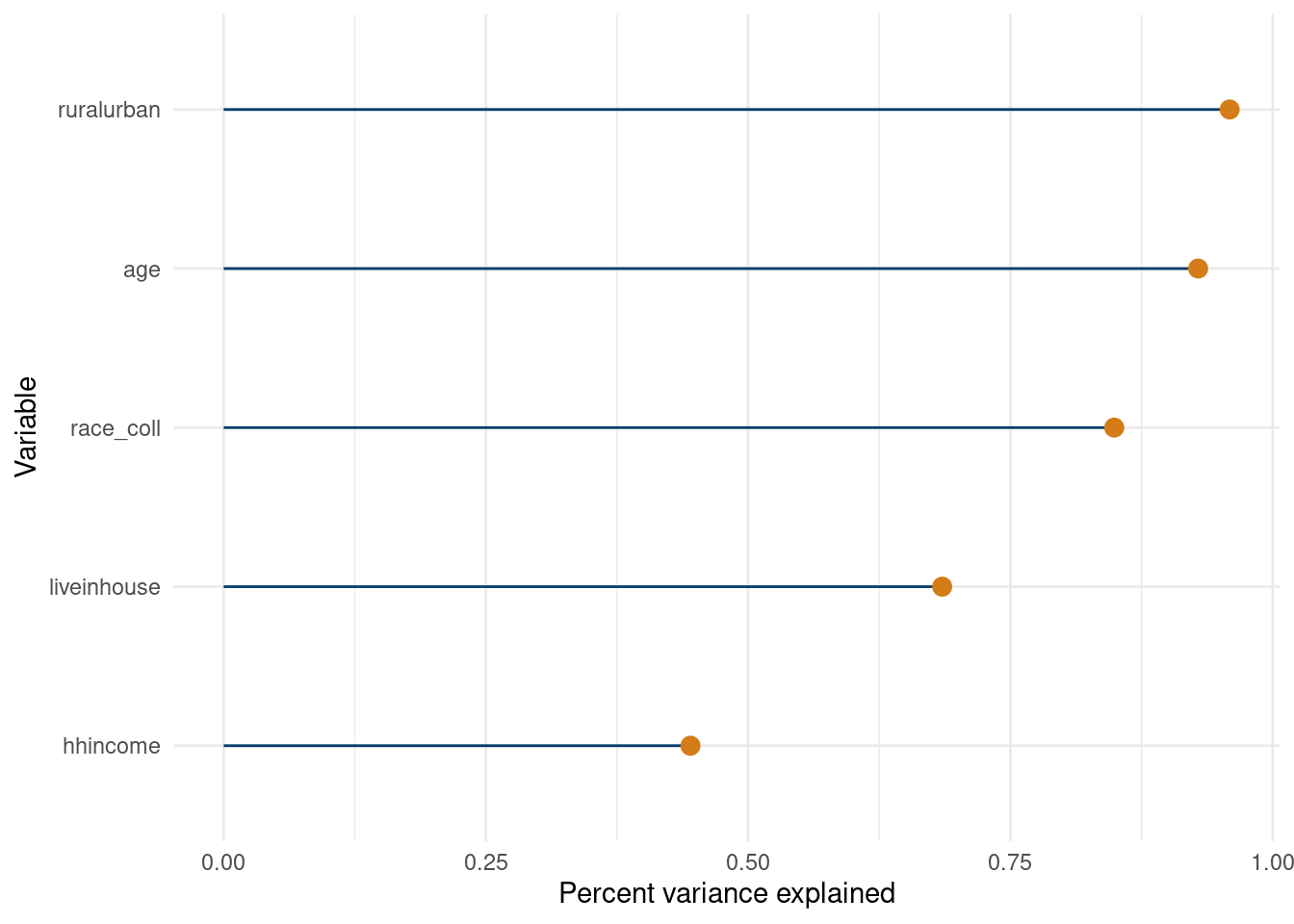
Let’s do a fit the fit approach because why not? The variable on the bottom of the \(y\)-axis is the “most important” in the sense that it explains the most variance of the fit on its own. The plot was flipped from the last time just to see which looks better.

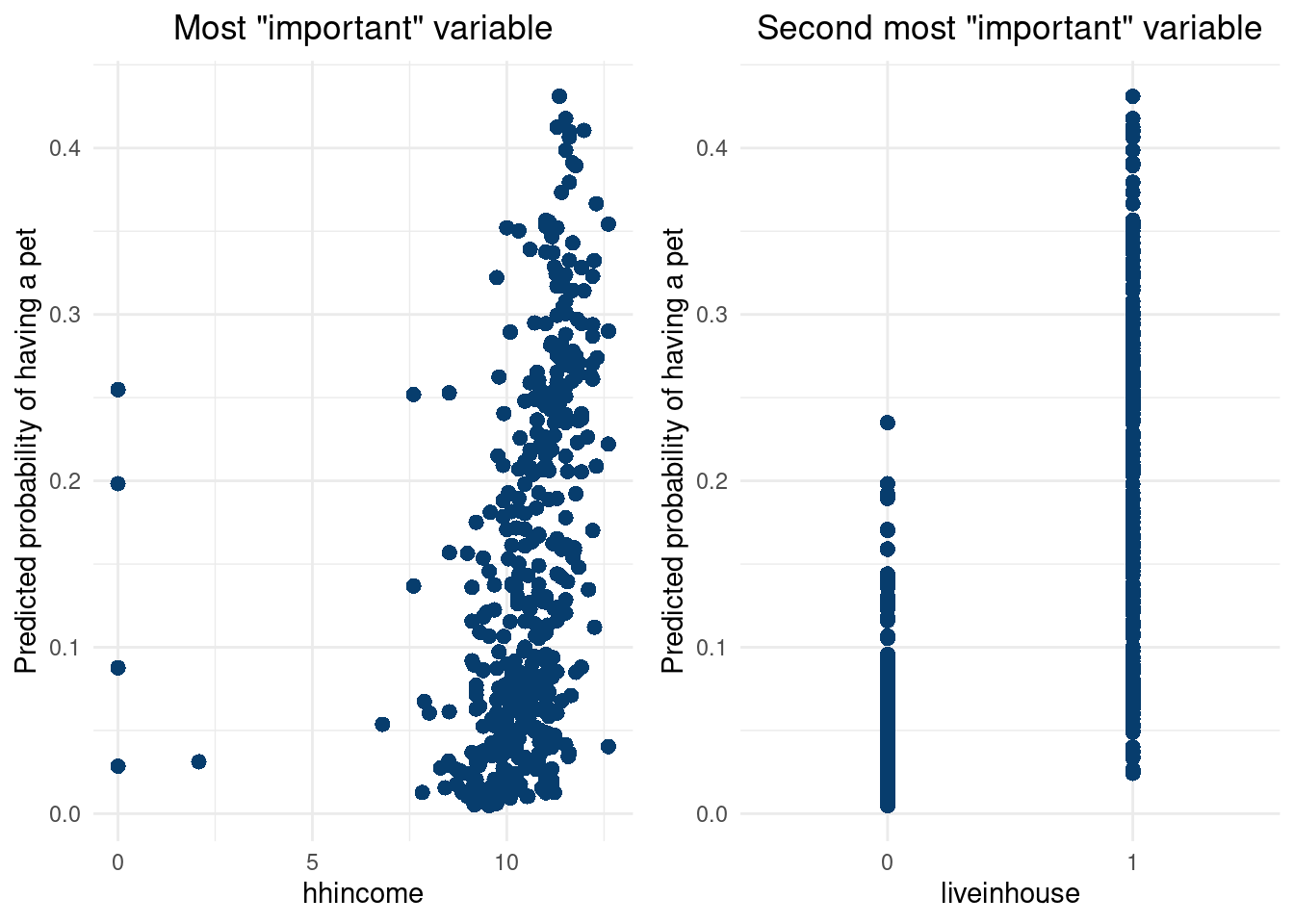
We also plot the “top variables” individually versus the fit. The first looks to be relatively correlated, but the second seems to not have much of an impact. This does show the nice nice about the “fit the fit” approach using a large tree in the second stage approximation, as variable interactions can be picked up well with large trees. The second variable does not contribute much individually, but appears to be useful when acting alongside the first variable.

Click here for full code
suppressMessages(library(nonlinvarsel))
suppressMessages(library(plotly))
suppressMessages(library(gridExtra))
set.seed(012024)
vsfr = vsf(X_test,rowMeans(pnorm(pihat$y_hat_test)), pMax=5)
in vsf, on iteration:  1 
in vsf, on iteration:  2 
in vsf, on iteration:  3 
in vsf, on iteration:  4 
in vsf, on iteration:  5 
Click here for full code
#https://www.data-to-viz.com/caveat/spider.html
#ggplotly(
data.frame(names = vsfr$xnames[vsfr$vrank$varorder[1:length(vsfr$R2)]], r2=vsfr$R2) %>% 
           mutate(r2 = round(r2,3))%>%
           arrange(r2) %>% 
           ggplot( aes(x=reorder(names,r2), y=r2)) +
           geom_segment( aes(x=reorder(names,r2) ,
                             xend=reorder(names,r2), y=0, yend=r2), color="#073d6d", size=.5) +
           geom_point(size=3, color='#d47c17')+
           coord_flip() +
           xlab('Variable')+
           ylab('Percent variance explained')+
           theme_minimal()

Click here for full code
#)
var_1 = vsfr$xnames[vsfr$vrank$varorder[1:length(vsfr$R2)]][1]
var_2 = vsfr$xnames[vsfr$vrank$varorder[1:length(vsfr$R2)]][2]

df2 = data.frame(var1 = X_test[, var_1], var2 = X_test[, var_2], 
                 ypred = rowMeans(pnorm(pihat$y_hat_test)))

grid.arrange(ggplot(df2, aes(x = var1, y = ypred)) +
  geom_point(size=2.5, color='#073d6d', pch=16)+
 # geom_density_2d(linewidth=2,color= '#55AD89', alpha=0.95) +
 #geom_abline(color='#F4911E', linewidth=1)+
  xlab(var_1)+ylab('Predicted probability of having a pet')+
  theme_minimal()+
  ggtitle('Most "important" variable')+
  theme(plot.title = element_text(hjust = 0.5)), 

 ggplot(df2, aes(x = var2, y = ypred)) +
  geom_point(size=2.5, color='#073d6d', pch=16)+
  #geom_density_2d(linewidth=2,color= '#55AD89', alpha=0.95) +
 #geom_abline(color='#F4911E', linewidth=1)+
  xlab(var_2)+ylab('Predicted probability of having a pet')+
  theme_minimal()+
  ggtitle('Second most "important" variable')+
  theme(plot.title = element_text(hjust = 0.5)), 
 nrow=1)

How do evaluate our model? Past metrics we have studied include the root mean squared error (RMSE) or \(r^2\) or other bespoke metrics for the problem at hand, such as a weighted squared error loss. However, those are all designed for continuous outcomes. The mean squared error, for example, does not make a ton of sense when \(y\) can only be 0 or 1. A simple first alternative is just to look at the accuracy of a binary classifier. Run our predictive model, classify our predicted outputs based on some threshold (such as greater than 50% indicates a label of \(\hat{y}=1\), \(0\) otherwise). We then return the number of correct predictions divided by the total as our accuracy metric. However, this begs the question of what threshold to choose? Say we have an imbalanced training data, where 99% of the outputs are one class, and our predictive model predicts the major class every time. This would yield an accuracy of 99%, despite not being a meaningful model. See this interesting New Yorker article from 2017.

Instead, we introduce a concept called the receiver operating curve (ROC). The curve is a plot of the true postive rate vs the false positive rate. The true positive rate is the percentage of .

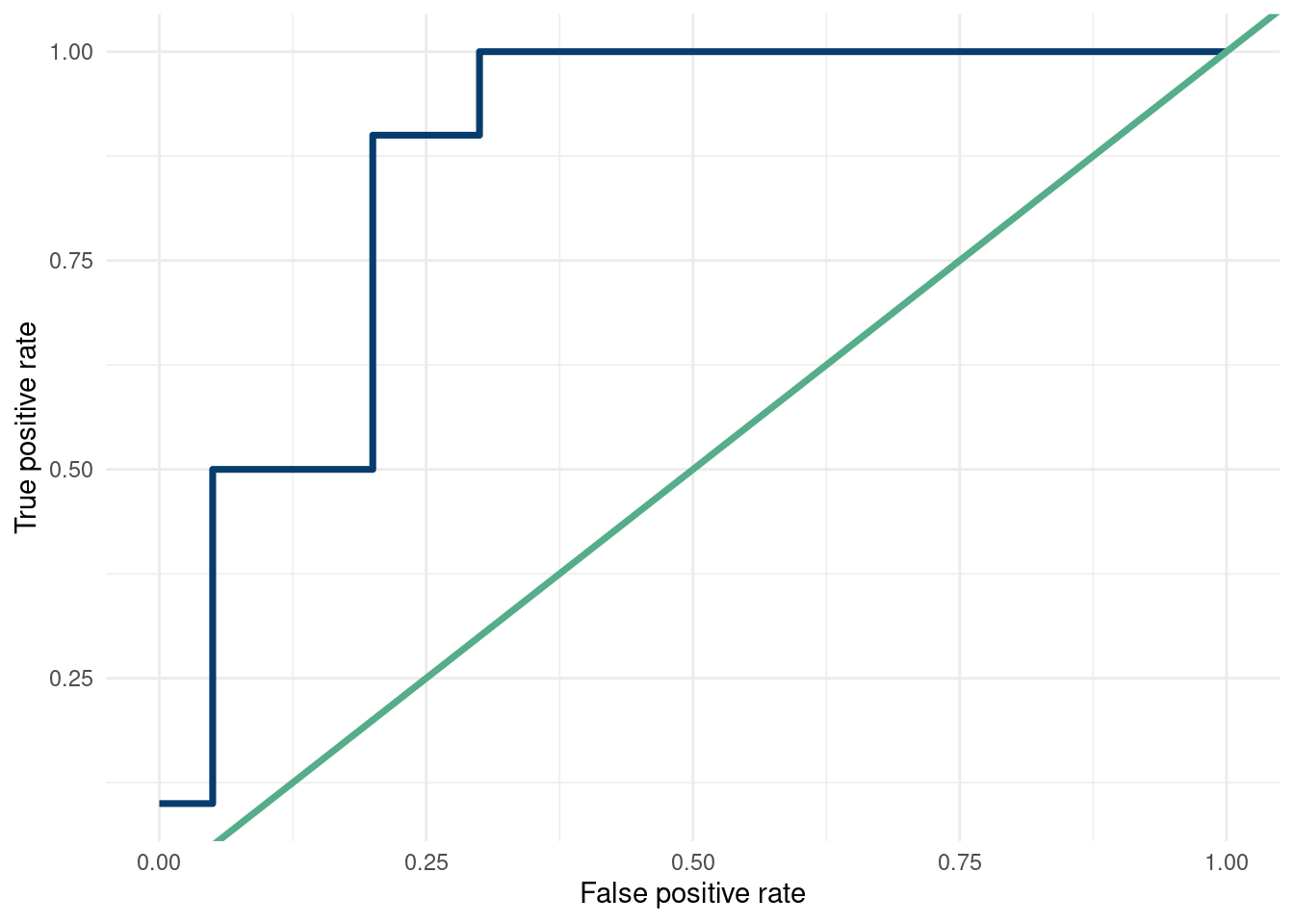
Making the ROC proceeds as follows. Sort the predicted probabilities. Say for our \(y\) we have 10 “1”’s, and 20 “0”s. We then put the \(y\)’s associated with the predicted probabilities next to the \(y\)’s. If \(y=1\), make the \(y\)-axis value (the true positive rate) go up by 1/10, while the x-axis value (the false positive rate) stays constant. If \(y=0\), then the \(x\)-axis changes by 1/20 to the right and the \(y\)-axis stays constant. See the example below for a visual of this:

Click here for full code
options(warn=-1)
suppressMessages(library(dplyr))
suppressMessages(library(tidyverse))
suppressMessages(library(gt))
probs = seq(from=1,to=0, length.out=30)
y = c(1,0,1,1,1,1,0,0,0,1,1,1,1,0,0,1)
y = c(y, rep(0,30-length(y)))

df = data.frame(probs, y)%>%
  mutate(y_val = ifelse(y>0,1/10,0),
  x_val =ifelse(y==0,1/20,0))%>%
  mutate(y_val = cumsum(y_val),
         x_val = cumsum(x_val))
df%>%
  gt()
probs y y_val x_val
1.00000000 1 0.1 0.00
0.96551724 0 0.1 0.05
0.93103448 1 0.2 0.05
0.89655172 1 0.3 0.05
0.86206897 1 0.4 0.05
0.82758621 1 0.5 0.05
0.79310345 0 0.5 0.10
0.75862069 0 0.5 0.15
0.72413793 0 0.5 0.20
0.68965517 1 0.6 0.20
0.65517241 1 0.7 0.20
0.62068966 1 0.8 0.20
0.58620690 1 0.9 0.20
0.55172414 0 0.9 0.25
0.51724138 0 0.9 0.30
0.48275862 1 1.0 0.30
0.44827586 0 1.0 0.35
0.41379310 0 1.0 0.40
0.37931034 0 1.0 0.45
0.34482759 0 1.0 0.50
0.31034483 0 1.0 0.55
0.27586207 0 1.0 0.60
0.24137931 0 1.0 0.65
0.20689655 0 1.0 0.70
0.17241379 0 1.0 0.75
0.13793103 0 1.0 0.80
0.10344828 0 1.0 0.85
0.06896552 0 1.0 0.90
0.03448276 0 1.0 0.95
0.00000000 0 1.0 1.00
Click here for full code
df %>%
  ggplot(aes(x=x_val, y=y_val))+geom_line(col='#073d6d', lwd=1.25)+
  geom_abline(col='#55ad89', lwd=1.25)+
  xlab('False positive rate')+ylab('True positive rate')+
  theme_minimal()

If the sorted probabilities correspond to the \(y\) labels being perfectly sorted, the curve will go all the way up then all the way right, meaning an excellent prediction. If the \(y\)’s are randomly oriented compared to the sorted probabilities, the ROC will be along the \(y=x\) line.

The AUC (area under curve) calculates just that. An AUC of 1 is ideal, and an AUC of 0.51 is as bad as you can be, and is equivalent to randomly guessing.

1 since the area under the line is a triangle with base and height both equal to 1, \(\text{Area triangle} = \frac{1}{2}b*h\).

Another interpretation of the AUC, from a probabilistic standpoint, might be a little easier to understand. We can interpret the AUC as the probability a random selected “1” (actual \(y\)) will have a higher predicted predicted probability than a randomly selected “0” data point. See this stackoverflow exchange for a few nice perspectives on this. In other words, if we had a pair where there were one of each classification, we’d select the correct one the AUC% of the time.

This blog from Arize provides a nice visualization of the ROC, as does this stackoverflow answer.

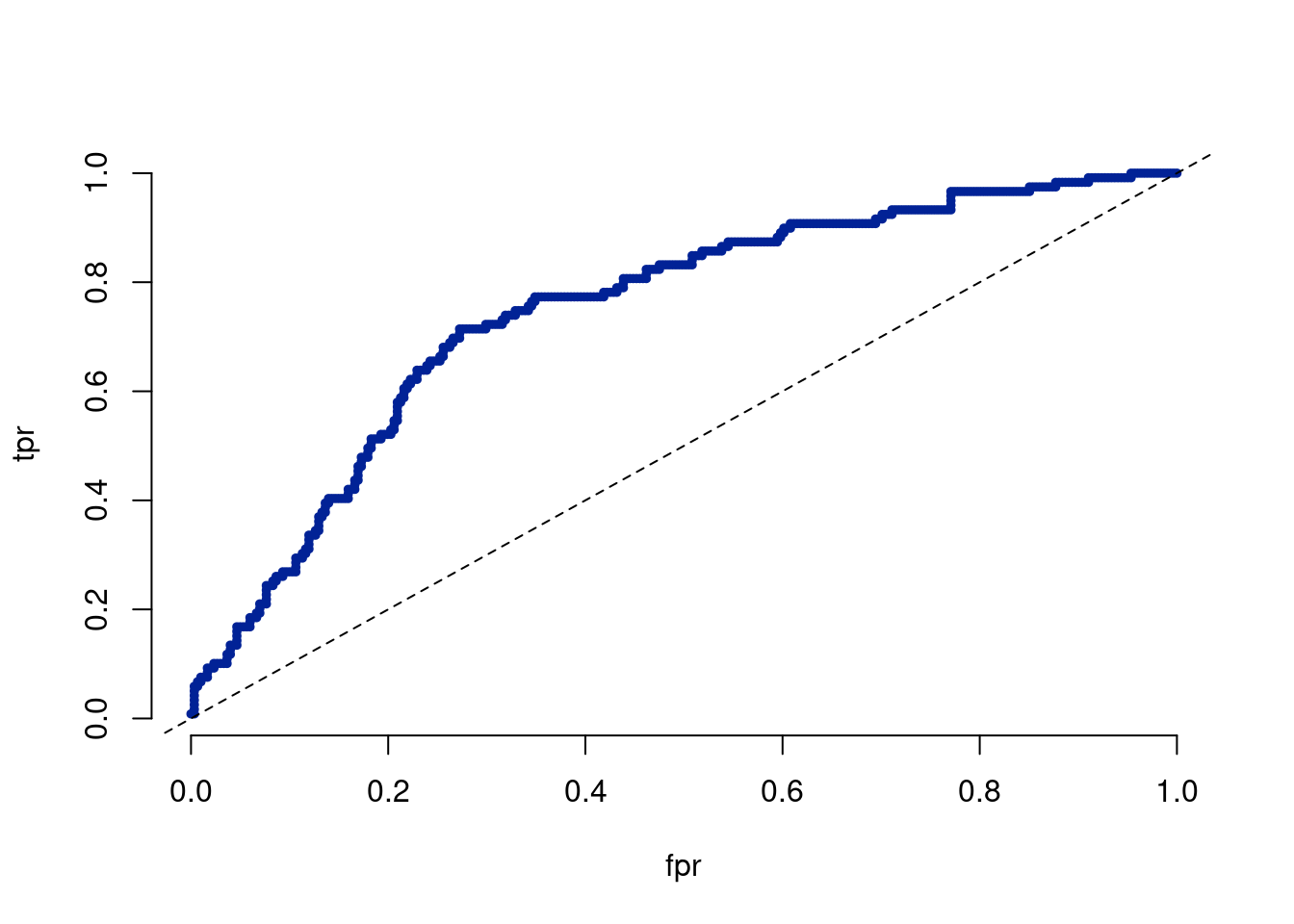
Let’s evaluate the ROC using this script from Richard Hahns site (Richards resource page which links to this script)

Click here for full code
plotROC <- function(pihat, ytrue, add = FALSE, col = '#012296') {
  
  thresh <- sort(pihat)
  N <- length(pihat)
  yhat <- sapply(1:N, function(a) as.double(pihat >= thresh[a]))
  tpr <- sapply(1:N, function(a) length(which(ytrue == 1 & yhat[, a] == 1)) / sum(ytrue == 1))
  fpr <- sapply(1:N, function(a) length(which(ytrue == 0 & yhat[, a] == 1)) / sum(ytrue == 0));
  if (add == FALSE) {
    plot(fpr, tpr, pch = 20, cex = 0.8, col = col, bty = 'n', type = 'b')
    abline(a = 0, b = 1, lty = 2)
  } else {
    points(fpr, tpr, pch = 20, cex = 0.8, col = col, bty = 'n', type = 'b')
  }
  #print(mean(tpr))
}
plotROC(rowMeans(pnorm(pihat$y_hat_test)), y_test)

Click here for full code
pROC::auc( y_test, rowMeans(pnorm(pihat$y_hat_test)))
Setting levels: control = 0, case = 1
Setting direction: controls < cases
Area under the curve: 0.7457

12.2.1 Brier scores

12.3 Multi-class classification

12.3.1 The BARTchelor

The data are from bach stats github (with more info here, (Lee et al. 2022)) and describe the popular ABC show “The Bachelor”. The goal is to predict which place people will finish on the show. We use a multinomial BART variant, meaning we predict the different outcomes as different classes. This is a fun example, but not an easy task. It also takes a little while to run since we have to predict 10 outcomes.

Click here for full code
suppressMessages(library(readr))
suppressMessages(library(BART))
suppressMessages(library(tidyverse))
suppressMessages(library(here))
suppressMessages(library(plotly))

bachelor_detail <- read.csv(paste0(here::here(), '/data/bach_data.csv') )     # raw data
bachelor_full <- read.csv(paste0(here::here(), '/data/bachelor_full.csv'))  # processed, one-hot-encoded

bachelor_full <- bachelor_full%>%
  mutate(FIR=ifelse(`FIR.`=='Yes', 1,0), 
         win=ifelse(Place%in%c(1,2,3,4,5), 1,0))%>%
  dplyr::select(-c(Name, Season,`FIR.` ))%>%
  na.omit()
bachelor_full$Age <- as.numeric(bachelor_full$Age)

'%!in%' <- function(x,y)!('%in%'(x,y))
# these are the features we predict with
vars=colnames(bachelor_full)[colnames(bachelor_full)%!in% 
                               c('Place')]


# Make everyone else 10'th place
bachelor_full$Place <- ifelse(bachelor_full$Place>9, 10, bachelor_full$Place)

# number of categories (places)
num_places <- length(unique(bachelor_full$Place))
# number of contestants
N = nrow(bachelor_full)
set.seed(12024)
# number of draws to skip at first
n_skip = 250
# number of posterior draws
n_draw = 250
sample <- sample(c(TRUE, FALSE), nrow(bachelor_full), replace=TRUE, prob=c(0.85,0.15))
x.train  <- bachelor_full[sample, vars]
x.test   <- bachelor_full[!sample, vars]
y.train = bachelor_full[sample,]$Place
y.test = bachelor_full[!sample,]$Place

# predict on these features

post=mbart(as.matrix(x.train), as.matrix(y.train), as.matrix(x.test), 
           nskip=n_skip, 
           ndpost=n_draw, 
           printevery = 2500,
           mc.cores=3)
*****Calling gbart: type=2
*****Data:
data:n,p,np: 359, 18, 63
y1,yn: 0.000000, 0.000000
x1,x[n*p]: 27.000000, 0.000000
xp1,xp[np*p]: 25.000000, 0.000000
*****Number of Trees: 50
*****Number of Cut Points: 14 ... 1
*****burn,nd,thin: 250,2500,10
*****Prior:beta,alpha,tau,nu,lambda,offset: 2,0.95,0.212132,3,1,-1.91329
*****Dirichlet:sparse,theta,omega,a,b,rho,augment: 0,0,1,0.5,1,18,0
*****printevery: 2500

MCMC
done 0 (out of 2750)
done 2500 (out of 2750)
time: 1s
trcnt,tecnt: 250,250

*****Calling gbart: type=2
*****Data:
data:n,p,np: 349, 18, 63
y1,yn: 0.000000, 0.000000
x1,x[n*p]: 27.000000, 0.000000
xp1,xp[np*p]: 25.000000, 0.000000
*****Number of Trees: 50
*****Number of Cut Points: 14 ... 1
*****burn,nd,thin: 250,2500,10
*****Prior:beta,alpha,tau,nu,lambda,offset: 2,0.95,0.212132,3,1,-1.78354
*****Dirichlet:sparse,theta,omega,a,b,rho,augment: 0,0,1,0.5,1,18,0
*****printevery: 2500

MCMC
done 0 (out of 2750)
done 2500 (out of 2750)
time: 2s
trcnt,tecnt: 250,250
*****Calling gbart: type=2
*****Data:
data:n,p,np: 336, 18, 63
y1,yn: 1.000000, 0.000000
x1,x[n*p]: 27.000000, 0.000000
xp1,xp[np*p]: 25.000000, 0.000000
*****Number of Trees: 50
*****Number of Cut Points: 14 ... 1
*****burn,nd,thin: 250,2500,10
*****Prior:beta,alpha,tau,nu,lambda,offset: 2,0.95,0.212132,3,1,-1.73166
*****Dirichlet:sparse,theta,omega,a,b,rho,augment: 0,0,1,0.5,1,18,0
*****printevery: 2500

MCMC
done 0 (out of 2750)
done 2500 (out of 2750)
time: 1s
trcnt,tecnt: 250,250
*****Calling gbart: type=2
*****Data:
data:n,p,np: 322, 18, 63
y1,yn: 1.000000, 0.000000
x1,x[n*p]: 23.000000, 0.000000
xp1,xp[np*p]: 25.000000, 0.000000
*****Number of Trees: 50
*****Number of Cut Points: 14 ... 1
*****burn,nd,thin: 250,2500,10
*****Prior:beta,alpha,tau,nu,lambda,offset: 2,0.95,0.212132,3,1,-1.74638
*****Dirichlet:sparse,theta,omega,a,b,rho,augment: 0,0,1,0.5,1,18,0
*****printevery: 2500

MCMC
done 0 (out of 2750)
done 2500 (out of 2750)
time: 2s
trcnt,tecnt: 250,250
*****Calling gbart: type=2
*****Data:
data:n,p,np: 309, 18, 63
y1,yn: 1.000000, 0.000000
x1,x[n*p]: 29.000000, 0.000000
xp1,xp[np*p]: 25.000000, 0.000000
*****Number of Trees: 50
*****Number of Cut Points: 14 ... 1
*****burn,nd,thin: 250,2500,10
*****Prior:beta,alpha,tau,nu,lambda,offset: 2,0.95,0.212132,3,1,-1.62784
*****Dirichlet:sparse,theta,omega,a,b,rho,augment: 0,0,1,0.5,1,18,0
*****printevery: 2500

MCMC
done 0 (out of 2750)
done 2500 (out of 2750)
time: 1s
trcnt,tecnt: 250,250

*****Calling gbart: type=2
*****Data:
data:n,p,np: 293, 18, 63
y1,yn: 0.000000, 0.000000
x1,x[n*p]: 26.000000, 0.000000
xp1,xp[np*p]: 25.000000, 0.000000
*****Number of Trees: 50
*****Number of Cut Points: 14 ... 1
*****burn,nd,thin: 250,2500,10
*****Prior:beta,alpha,tau,nu,lambda,offset: 2,0.95,0.212132,3,1,-1.60173
*****Dirichlet:sparse,theta,omega,a,b,rho,augment: 0,0,1,0.5,1,18,0
*****printevery: 2500

MCMC
done 0 (out of 2750)
done 2500 (out of 2750)
time: 1s
trcnt,tecnt: 250,250

*****Calling gbart: type=2
*****Data:
data:n,p,np: 277, 18, 63
y1,yn: 1.000000, 0.000000
x1,x[n*p]: 26.000000, 0.000000
xp1,xp[np*p]: 25.000000, 0.000000
*****Number of Trees: 50
*****Number of Cut Points: 14 ... 1
*****burn,nd,thin: 250,2500,10
*****Prior:beta,alpha,tau,nu,lambda,offset: 2,0.95,0.212132,3,1,-1.71338
*****Dirichlet:sparse,theta,omega,a,b,rho,augment: 0,0,1,0.5,1,18,0
*****printevery: 2500

MCMC
done 0 (out of 2750)
done 2500 (out of 2750)
time: 1s
trcnt,tecnt: 250,250
*****Calling gbart: type=2
*****Data:
data:n,p,np: 265, 18, 63
y1,yn: 0.000000, 0.000000
x1,x[n*p]: 24.000000, 0.000000
xp1,xp[np*p]: 25.000000, 0.000000
*****Number of Trees: 50
*****Number of Cut Points: 14 ... 1
*****burn,nd,thin: 250,2500,10
*****Prior:beta,alpha,tau,nu,lambda,offset: 2,0.95,0.212132,3,1,-1.82551
*****Dirichlet:sparse,theta,omega,a,b,rho,augment: 0,0,1,0.5,1,18,0
*****printevery: 2500

MCMC
done 0 (out of 2750)
done 2500 (out of 2750)
time: 2s
trcnt,tecnt: 250,250
*****Calling gbart: type=2
*****Data:
data:n,p,np: 256, 18, 63
y1,yn: 1.000000, 0.000000
x1,x[n*p]: 24.000000, 0.000000
xp1,xp[np*p]: 25.000000, 0.000000
*****Number of Trees: 50
*****Number of Cut Points: 14 ... 1
*****burn,nd,thin: 250,2500,10
*****Prior:beta,alpha,tau,nu,lambda,offset: 2,0.95,0.212132,3,1,-1.63733
*****Dirichlet:sparse,theta,omega,a,b,rho,augment: 0,0,1,0.5,1,18,0
*****printevery: 2500

MCMC
done 0 (out of 2750)
done 2500 (out of 2750)
time: 1s
trcnt,tecnt: 250,250
Click here for full code
# mean of the posteriors...just a single number per person for that place
test_prob_mean <- post$prob.test.mean


# the posteriors for every person...ndraws for each person/category combo!
test_probs <- post$prob.test
test_probs <- as.data.frame(t(post$prob.test))


# the dimension is N contestants * k categories by ndraw kept!
#dim(test_probs)
Ntest = nrow(x.test)


# so, the data is saved by the person1, cat1, person1, cat2, etc...
test_probs$cat <- c(rep(seq(from=1, to=num_places), Ntest))#

test_probs$person <- unlist(lapply(1:Ntest, function(w)rep(w, num_places)))


test_matrix = matrix(post$prob.test.mean, ncol = num_places, byrow = T)

# find predict place as highest mean probability
ypred1 = sapply(1:Ntest, function(x) which(post$prob.test.mean[((x-1)*num_places+1):(x*num_places)]==max(post$prob.test.mean[((x-1)*num_places+1):(x*num_places)])))
second_place <- sapply(1:Ntest, function(i) order(-test_matrix[i,])[2])
first_place <- sapply(1:Ntest, function(i) order(-test_matrix[i,])[1])

results = data.frame(y.test,ypred1,second_place,first_place)


ggplot(results, aes(x=y.test, y= ypred1)) + 
  geom_line(aes(x=y.test, y=y.test),
                               color = '#E0B0FF',lwd = 1.25) + 
  geom_point(color = '#Da70D6',size = 2.5) +
  coord_fixed() + xlab('True') + ylab('Predicted') +
  geom_rug(color = '#E0B0FF') +
  #geom_point(aes(x = y.test,y=second_place),color = "#f18cb3",size = 3) +
  theme_minimal()

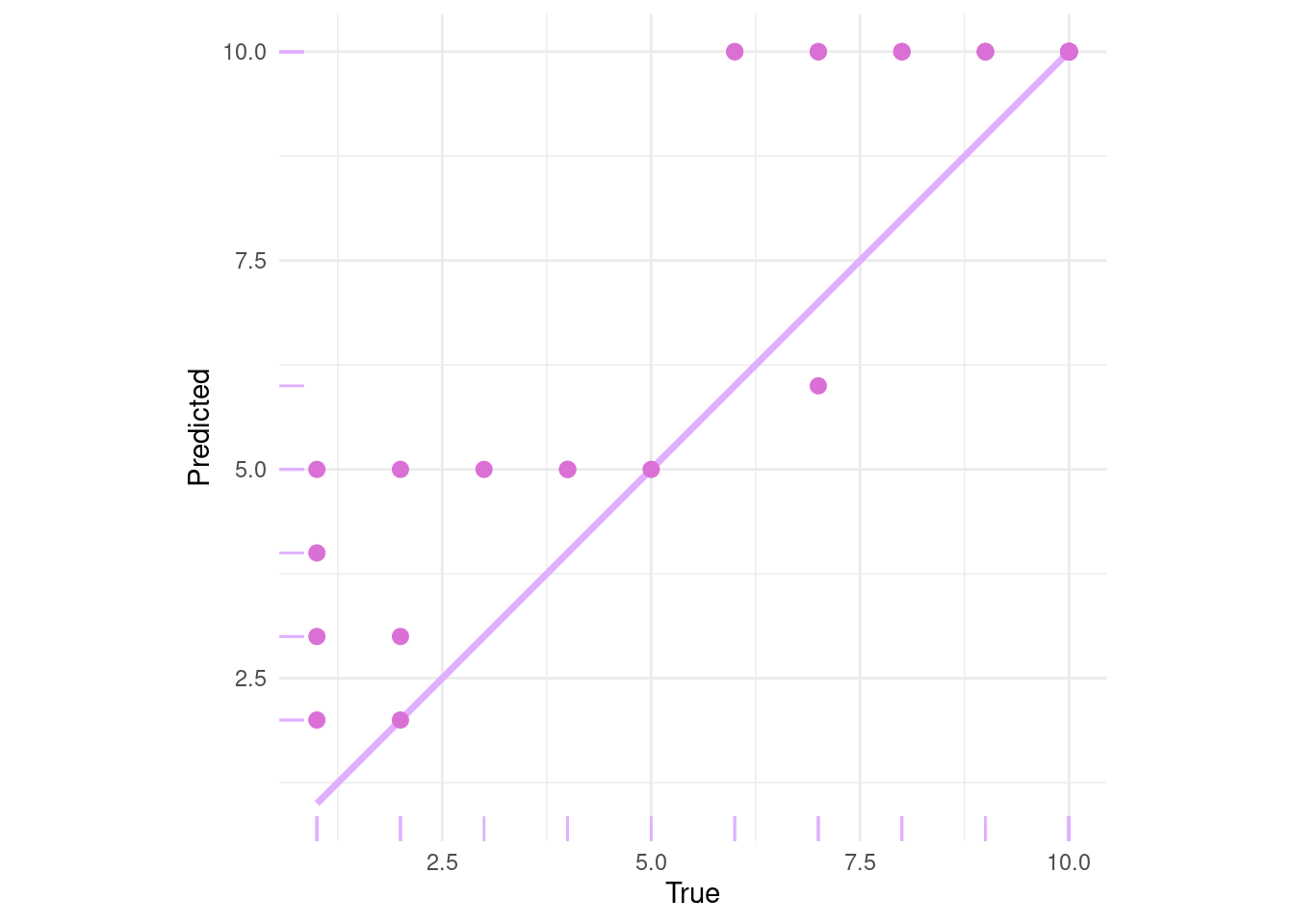
The fit is not fantastic. There is not much data on the participants, nor is there a lot of variation in the data (most contestants are white and in their mid 20’s). There also probably not is a particularly strong signal, and the data is imbalanced since most people get eliminated early on (and thus are encoded as 16th place). Oh well, this is meant for as a fun example then anything else.

How would Sam and Demetri fare on the show? First, let’s do Sam:

Click here for full code
# Note: Race0 = White, Race1 =  Black, Race2 = Asian, Race3 = Hispanic, Race4 = Middle Eastern


# # Me, Dem
 x.test = data.frame(Season = c(25,16),
                     Age = c(25,27),
                     FIR = c(0,1),
                     INTERNATIONAL = c(0,0),
                     NE = c(0,1), NW = c(0,0), SE = c(0,0), SW = c(1,0),
                     Race_0 = c(1,1), Race_1 = c(0,0), Race_2 = c(1,0), Race_3 = c(0,0), Race_4 = c(0,0),
                     CORPORATE = c(0,0), OTHER = c(1,0),POLITICS = c(0,0), TRADES = c(0,0), TRADITIONAL = c(0,1),
                     X1.on.1.week = c(4,0))
x.test = x.train
fun_post=mbart(as.matrix(x.train), as.matrix(y.train), as.matrix(x.test), 
           nskip=n_skip, 
           ndpost=n_draw, 
           printevery = 2500,
           mc.cores=3)
*****Calling gbart: type=2
*****Data:
data:n,p,np: 359, 18, 359
y1,yn: 0.000000, 0.000000
x1,x[n*p]: 27.000000, 0.000000
xp1,xp[np*p]: 27.000000, 0.000000
*****Number of Trees: 50
*****Number of Cut Points: 14 ... 1
*****burn,nd,thin: 250,2500,10
*****Prior:beta,alpha,tau,nu,lambda,offset: 2,0.95,0.212132,3,1,-1.91329
*****Dirichlet:sparse,theta,omega,a,b,rho,augment: 0,0,1,0.5,1,18,0
*****printevery: 2500

MCMC
done 0 (out of 2750)
done 2500 (out of 2750)
time: 2s
trcnt,tecnt: 250,250
*****Calling gbart: type=2
*****Data:
data:n,p,np: 349, 18, 359
y1,yn: 0.000000, 0.000000
x1,x[n*p]: 27.000000, 0.000000
xp1,xp[np*p]: 27.000000, 0.000000
*****Number of Trees: 50
*****Number of Cut Points: 14 ... 1
*****burn,nd,thin: 250,2500,10
*****Prior:beta,alpha,tau,nu,lambda,offset: 2,0.95,0.212132,3,1,-1.78354
*****Dirichlet:sparse,theta,omega,a,b,rho,augment: 0,0,1,0.5,1,18,0
*****printevery: 2500

MCMC
done 0 (out of 2750)
done 2500 (out of 2750)
time: 1s
trcnt,tecnt: 250,250
*****Calling gbart: type=2
*****Data:
data:n,p,np: 336, 18, 359
y1,yn: 1.000000, 0.000000
x1,x[n*p]: 27.000000, 0.000000
xp1,xp[np*p]: 27.000000, 0.000000
*****Number of Trees: 50
*****Number of Cut Points: 14 ... 1
*****burn,nd,thin: 250,2500,10
*****Prior:beta,alpha,tau,nu,lambda,offset: 2,0.95,0.212132,3,1,-1.73166
*****Dirichlet:sparse,theta,omega,a,b,rho,augment: 0,0,1,0.5,1,18,0
*****printevery: 2500

MCMC
done 0 (out of 2750)
done 2500 (out of 2750)
time: 2s
trcnt,tecnt: 250,250
*****Calling gbart: type=2
*****Data:
data:n,p,np: 322, 18, 359
y1,yn: 1.000000, 0.000000
x1,x[n*p]: 23.000000, 0.000000
xp1,xp[np*p]: 27.000000, 0.000000
*****Number of Trees: 50
*****Number of Cut Points: 14 ... 1
*****burn,nd,thin: 250,2500,10
*****Prior:beta,alpha,tau,nu,lambda,offset: 2,0.95,0.212132,3,1,-1.74638
*****Dirichlet:sparse,theta,omega,a,b,rho,augment: 0,0,1,0.5,1,18,0
*****printevery: 2500

MCMC
done 0 (out of 2750)
done 2500 (out of 2750)
time: 1s
trcnt,tecnt: 250,250
*****Calling gbart: type=2
*****Data:
data:n,p,np: 309, 18, 359
y1,yn: 1.000000, 0.000000
x1,x[n*p]: 29.000000, 0.000000
xp1,xp[np*p]: 27.000000, 0.000000
*****Number of Trees: 50
*****Number of Cut Points: 14 ... 1
*****burn,nd,thin: 250,2500,10
*****Prior:beta,alpha,tau,nu,lambda,offset: 2,0.95,0.212132,3,1,-1.62784
*****Dirichlet:sparse,theta,omega,a,b,rho,augment: 0,0,1,0.5,1,18,0
*****printevery: 2500

MCMC
done 0 (out of 2750)
done 2500 (out of 2750)
time: 1s
trcnt,tecnt: 250,250
*****Calling gbart: type=2
*****Data:
data:n,p,np: 293, 18, 359
y1,yn: 0.000000, 0.000000
x1,x[n*p]: 26.000000, 0.000000
xp1,xp[np*p]: 27.000000, 0.000000
*****Number of Trees: 50
*****Number of Cut Points: 14 ... 1
*****burn,nd,thin: 250,2500,10
*****Prior:beta,alpha,tau,nu,lambda,offset: 2,0.95,0.212132,3,1,-1.60173
*****Dirichlet:sparse,theta,omega,a,b,rho,augment: 0,0,1,0.5,1,18,0
*****printevery: 2500

MCMC
done 0 (out of 2750)
done 2500 (out of 2750)
time: 2s
trcnt,tecnt: 250,250
*****Calling gbart: type=2
*****Data:
data:n,p,np: 277, 18, 359
y1,yn: 1.000000, 0.000000
x1,x[n*p]: 26.000000, 0.000000
xp1,xp[np*p]: 27.000000, 0.000000
*****Number of Trees: 50
*****Number of Cut Points: 14 ... 1
*****burn,nd,thin: 250,2500,10
*****Prior:beta,alpha,tau,nu,lambda,offset: 2,0.95,0.212132,3,1,-1.71338
*****Dirichlet:sparse,theta,omega,a,b,rho,augment: 0,0,1,0.5,1,18,0
*****printevery: 2500

MCMC
done 0 (out of 2750)
done 2500 (out of 2750)
time: 1s
trcnt,tecnt: 250,250

*****Calling gbart: type=2
*****Data:
data:n,p,np: 265, 18, 359
y1,yn: 0.000000, 0.000000
x1,x[n*p]: 24.000000, 0.000000
xp1,xp[np*p]: 27.000000, 0.000000
*****Number of Trees: 50
*****Number of Cut Points: 14 ... 1
*****burn,nd,thin: 250,2500,10
*****Prior:beta,alpha,tau,nu,lambda,offset: 2,0.95,0.212132,3,1,-1.82551
*****Dirichlet:sparse,theta,omega,a,b,rho,augment: 0,0,1,0.5,1,18,0
*****printevery: 2500

MCMC
done 0 (out of 2750)
done 2500 (out of 2750)
time: 1s
trcnt,tecnt: 250,250

*****Calling gbart: type=2
*****Data:
data:n,p,np: 256, 18, 359
y1,yn: 1.000000, 0.000000
x1,x[n*p]: 24.000000, 0.000000
xp1,xp[np*p]: 27.000000, 0.000000
*****Number of Trees: 50
*****Number of Cut Points: 14 ... 1
*****burn,nd,thin: 250,2500,10
*****Prior:beta,alpha,tau,nu,lambda,offset: 2,0.95,0.212132,3,1,-1.63733
*****Dirichlet:sparse,theta,omega,a,b,rho,augment: 0,0,1,0.5,1,18,0
*****printevery: 2500

MCMC
done 0 (out of 2750)
done 2500 (out of 2750)
time: 1s
trcnt,tecnt: 250,250
Click here for full code
# The probabilities for Sam and Demetri
test_probs <- fun_post$prob.test
test_probs <- as.data.frame(t(fun_post$prob.test))


Ntest = nrow(x.test)


# so, the data is saved by the person1, cat1, person1, cat2, etc...
test_probs$cat <- c(rep(seq(from=1, to=num_places), Ntest))#
test_probs$person <- unlist(lapply(1:Ntest, function(w)rep(w, num_places)))

personal_probs <- test_probs%>%
  dplyr::filter(person==1)%>%
  group_by(cat)
personal_probs <- as.data.frame(unlist(lapply(1:n_draw,function(m)
  personal_probs[,m])))
personal_probs$cat <- c(rep(seq(from=1, to=num_places), n_draw))
  #unlist(lapply(1:num_places, function(w)rep(w, n_draw)))
colnames(personal_probs) <- c('posteriors', 'place')
ggplotly(personal_probs%>%
  ggplot(aes(x=as.factor(place), y=posteriors))+geom_boxplot()+
  theme_minimal()+xlab('Bachelor finishing place')+ylab('Posterior probability'))
Click here for full code
ggplotly(as.data.frame(personal_probs)%>%
           group_by(place)%>%
  dplyr::summarize(post_mean =  mean(posteriors))%>%
  ggplot(aes(x=place, y=cumsum(post_mean)))+geom_line()+
    ylab('Sam cumulative probability of finishing this place or better')+
  theme_minimal())

Now, Demetri

Click here for full code
personal_probs <- test_probs%>%
  dplyr::filter(person==2)%>%
  group_by(cat)
personal_probs <- as.data.frame(unlist(lapply(1:n_draw,function(m)
  personal_probs[,m])))
personal_probs$cat <- c(rep(seq(from=1, to=num_places), n_draw))
  #unlist(lapply(1:num_places, function(w)rep(w, n_draw)))
colnames(personal_probs) <- c('posteriors', 'place')
ggplotly(personal_probs%>%
  ggplot(aes(x=as.factor(place), y=posteriors))+geom_boxplot()+
  theme_minimal()+xlab('Place')+ylab('Posterior probability'))
Click here for full code
ggplotly(as.data.frame(personal_probs)%>%
           group_by(place)%>%
  dplyr::summarize(post_mean =  mean(posteriors))%>%
  ggplot(aes(x=place, y=cumsum(post_mean)))+geom_line()+
    ylab('Demetri cumulative probability of finishing this place or better')+
  theme_minimal())
Assignment (12.2)

This problem screams “feature engineering” and “data collection”. While for many these are not their favorite part of the job, it is necessary. Try and find more data (which may mean a lot of sitting on a couch and watching the show) or manipulate the features you have been given to try and point the BART model towards a signal. Test your improved model with your own covariates. The data you add can be a little subjective (for example, add a “villain” tag).

12.4 Model calibration

COVID-19 forecasts provided a good example where there were many public real time forecasts (often informing policy decisions) and relatively reliable data to compare forecasted results with real results. Fivethirtyeight had an interactive feature where different models predictions were compared to actual results dating out a few weeks. (Sudhakar et al. 2024) provide an example of validating COVID model predictions as well. Prediciting upcoming COVID cases turned out to be a difficult task, due to dynamic changes in behaviour, weather changes, evolution of the disease itself, and having to contend with reporting issues and inaccurate data. Comparing models performance via “calibration” plots provides insight into which models are more trustworthy.

This procedure can also be done with weather forecasting. For example, hurricane forecasting (ahead of a season) is notoriously difficult. However, it is still a good exercise to check how well forecasts perform.

We will look at hurricane predictions from the research group of Michael Mann. These forecasts go back to 2009, and are some of the most well known seasonal hurricane forecasts. As Mann says:

Finally, it is an important demonstration of the strength of climate science models, Mann says. Scientists can make successful seasonal predictions based on the climate information they have, providing grounds for trust in longer-term climate predictions, particularly human-caused warming and its impacts.

2024 hurricane forecast

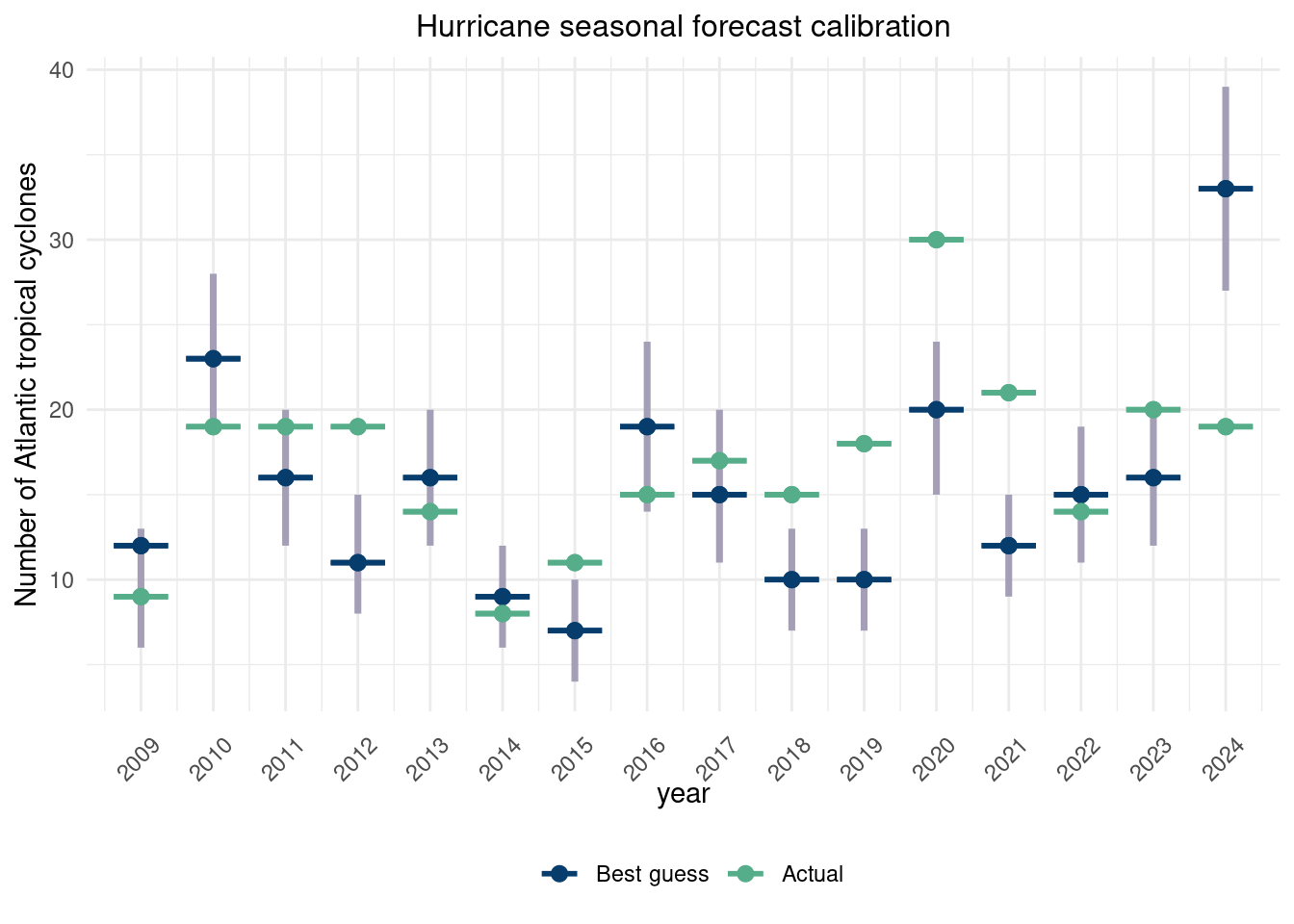
How do the forecasts hold up over time? Below, we plot the forecasts vs the actual, with the gray line and orange square indicating the 95% confidence range for each years forecast. Theoretically, 95/100 of these should contain the true number of hurricanes.

Click here for full code
options(warn=-1)
suppressMessages(library(dplyr))
suppressMessages(library(tidyverse))
# https://github.com/wilkelab/ungeviz
suppressMessages(library(ungeviz))
df = read.csv(paste0(here::here(), '/data/hurricane_forecasts.csv'))
df = df %>%drop_na()
plot_forecast = data.frame(year = df$Year,
  estimate = c(df$Range_low, df$Range_high), quant = c(rep('LB', nrow(df)), rep('UB', nrow(df))),
    best_guess = c(df$Best.Guess, df$Best.Guess), 
    actual = c(df$Actual.Count, df$Actual.Count))%>%
  mutate(diff = c(df$Range_high-df$Range_low,rep(0, nrow(df))))%>%
  ggplot(aes(x=year,y=estimate, color=quant))+
   geom_segment( aes(x=year, xend=year, y=estimate, yend=estimate+diff), 
                    color='#A49FB6',#color='#A9A9A9',
                 lwd=1.25)+ylab('Number of Atlantic tropical cyclones')+
      geom_point(aes(x=year, y=best_guess, color='#073d6d'), size=2.5)+ 
      geom_hpline(aes(x=year, y=best_guess, color='#073d6d'), size=1, width=0.75)+ 
      #geom_point(size=2., color='#d47c17', pch=15)+
      geom_hpline(aes(x=year, y=actual, color='#55AD89'), size=1., width=0.75)+
      geom_point(aes(x=year, y=actual, color='#55AD89'), size=2.5)+
      scale_x_continuous(labels=seq(from=2007, to=2025), breaks=seq(from=2007, to=2025))+

      theme_minimal()+#xlab(expression(paste("Value of ", psi)))+ 
      ggtitle('Hurricane seasonal forecast calibration')+
      scale_color_manual(values=c('#073d6d', "#55AD89"), 
                         label=c('Best guess', 'Actual'), name='')+
      scale_shape_manual(values=c(1,2,3,4))+
  theme(axis.text.x = element_text(angle = 45, vjust = 0.25, hjust=.5))+
        theme(plot.title=element_text(hjust=0.5, size=12), 
            legend.position="bottom")

plot_forecast

The forecasts do… not too hot. The forecasts are based off a regression model with features derived from physical insights and do okay, but are not super well calibrated. The 95% intervals do not cover the truth 95% of the time. This is not to say these models are bad! They are based off some deterministic physical laws which are well grounded. However, this plot showcases the difficulty in forecasting out something as fine as hurricane development far out into the future and that this is a difficult problem.


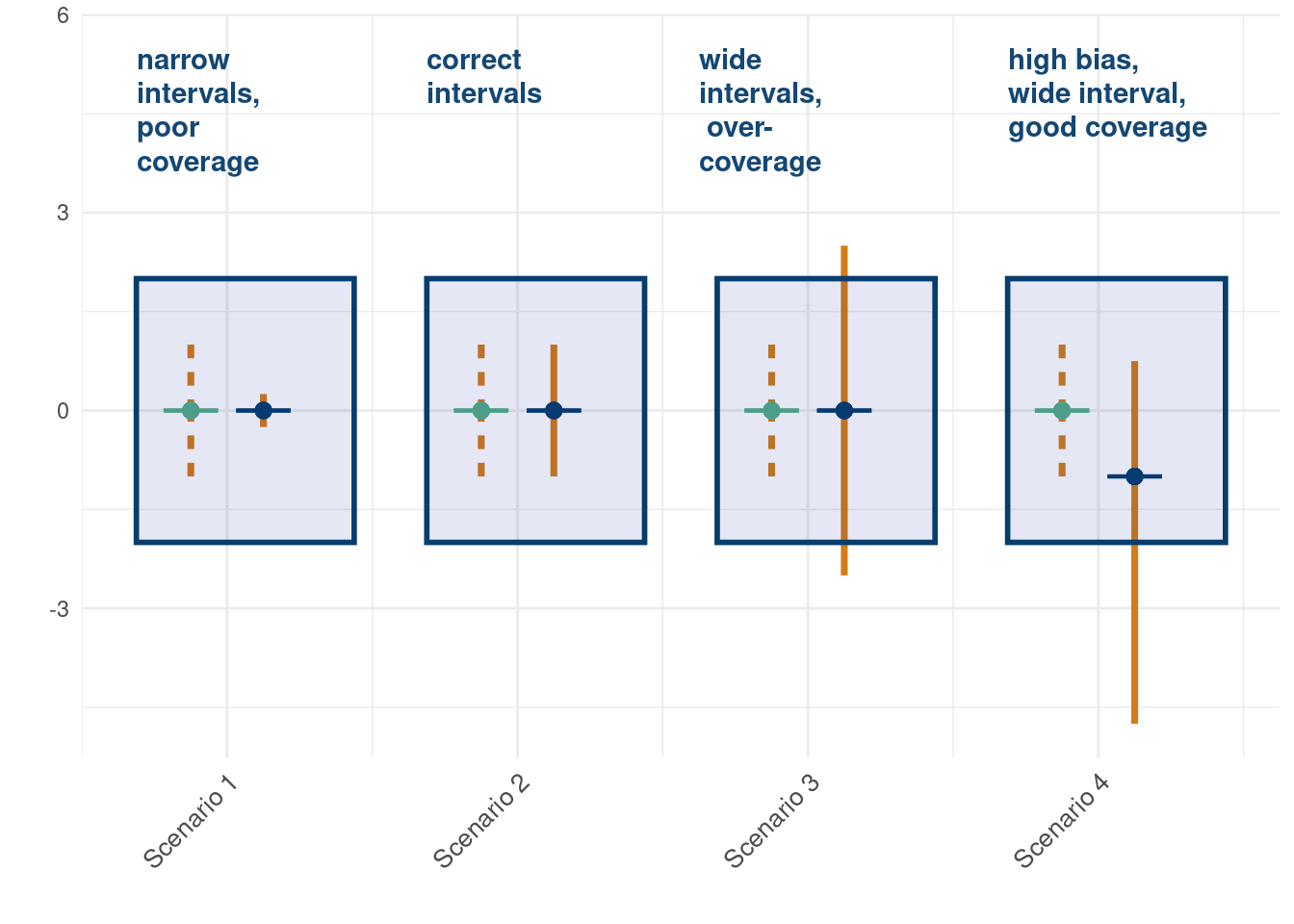
The following graph illustrates four ways we can be calibrated with respect to uncertainty quantification.

Click here for full code
options(warn=-1)
df = data.frame(forecast=rep(c(2,6,10,14,3,7,11,15),2), 
                actual = rep(c(0,0,0,0, 0,0,0,-1),2),
                range_val = c(-1,-1,-1, -1, -0.25, -1, -2.5,-4.75,
                              1,1,1,1,0.25, 1, 2.5, 0.75), 
                truth = rep(c('True','True', 'True', 'True', 
                              'forecast', 'forecast', 'forecast', 'forecast'),2))
df %>%
  mutate(diff = c(df$range_val[1:8]-df$range_val[1:8], rep(0, nrow(df)/2)))%>%
  ggplot(aes(x=forecast,y=actual, color=truth))+
  
  geom_segment( aes(x=forecast, xend=forecast, y=range_val, yend=actual+diff, 
                    linetype=truth), 
                color='#d47c17',#color='#A9A9A9',
                lwd=1.25)+
  geom_point(aes(x=forecast, y=actual, color=truth), size=2.5)+ 
  geom_hpline(aes(x=forecast, y=actual, color=truth), 
              size=.75, width=0.75)+ 
  #geom_point(size=2., color='#d47c17', pch=15)+
  geom_point(aes(x=forecast, y=actual, color=truth), size=2.5)+
  scale_color_manual(name='', values=c('#073d6d', '#55AD89'))+
  annotate(
    geom = "text", x = 1.25, y = 5.5, 
    label = "narrow\nintervals,\npoor\ncoverage",
    color = '#073d6d', alpha=0.95, fontface = "bold", 
    hjust = 0, vjust = 1, lineheight = 1
  ) +
  annotate(
    geom = "rect", xmin = 1.25, xmax = 4.25, ymin = -2, ymax = 2,
    fill = alpha('#012296', 0.1), color = '#073d6d', linewidth = 1
  )+
  
  annotate(
    geom = "text", x = 5.25, y = 5.5, 
    label = "correct\nintervals",
    color = '#073d6d', alpha=0.95, fontface = "bold", 
    hjust = 0, vjust = 1, lineheight = 1
  ) +
  annotate(
    geom = "rect", xmin = 5.25, xmax = 8.25, ymin = -2, ymax = 2,
    fill = alpha('#012296', 0.1), color = '#073d6d', linewidth = 1
  )+
  annotate(
    geom = "text", x = 9.0, y = 5.5, 
    label = "wide\nintervals,\n over-\ncoverage",
    color = '#073d6d', alpha=0.95, fontface = "bold", 
    hjust = 0, vjust = 1, lineheight = 1
  ) +
  annotate(
    geom = "rect", xmin = 9.25, xmax = 12.25, ymin = -2, ymax = 2,
    fill = alpha('#012296', 0.1), color = '#073d6d', linewidth = 1
  )+
  annotate(
    geom = "text", x = 13.25, y = 5.5, 
    label = "high bias,\nwide interval,\ngood coverage ",
    color = '#073d6d', alpha=0.95, fontface = "bold", 
    hjust = 0, vjust = 1, lineheight = 1
  ) +
  annotate(
    geom = "rect", xmin = 13.25, xmax = 16.25, ymin = -2, ymax = 2,
    fill = alpha('#012296', 0.1), color = '#073d6d', linewidth = 1
  )+
  xlab('')+ylab('')+
  scale_x_continuous(breaks=c(2.5,6.5,10.5,14.5),labels=c('Scenario 1', 
                            'Scenario 2', 
                            'Scenario 3', 
                            'Scenario 4'))+
  theme_minimal()+
  theme(legend.position="none", 
        axis.text.x = element_text(size = 10, 
                                   angle = 45, vjust = 1, hjust = 1))

12.5 Elo based forecasts

In this section we will discuss a pretty simple forecasting model based off the “Elo rating” concept from chess. Most of the complexity in this approach will be in the quantification of an entity’s (and its opponent’s) quality. The simulation portion is nothing we have not yet seen. Specifically, the ELO approach will be useful in game situations where an agent (player, team, etc) that competes against another can be rated based on the outcomes of the specific matchups. This is an alternative to other metrics like Win percentage, which do not account for the quality of the opponent and the decisiveness of the victory.

Imagine a sports league, say American football2, where all teams at the beginning of a season are considered equal. After the first week, half the teams have won their game and half have not. By the win percentage metric, half the league is equivalent and little useful information is gathered for any projection/forecasting of team wins from an analytic perspective. If, instead, we used the win/loss nature of the game to assign scores to teams based on who they beat, we can create a more meaningful statistic3.

2 For the convenience of the nice R package we will soon use.

3 We also could incorporate into the metric factors like the margin of victory/loss, then we would now have a more informative metric. This metric can be updated to also penalize home losses more which also rewards road victories.

This is the basis of the ELO rating, which can then be updated game over game (originally used with Chess players but now common in many sports). From wikipedia:

Elo’s central assumption was that the chess performance of each player in each game is a normally distributed random variable. Although a player might perform significantly better or worse from one game to the next, Elo assumed that the mean value of the performances of any given player changes only slowly over time. Elo thought of a player’s true skill as the mean of that player’s performance random variable.

For a sport like football where teams play so few games, this metric can provide more useful information quickly. The probability team \(A\) beats team \(B\) is given by:

\[ \Pr(\text{team A beats team B}) = \frac{1}{10^{-\frac{(\text{ELO}_{A}-\text{ELO}_{B})}{10}}+1} \]

What does that mean? Let’s look at the following graphic to visualize, with the Carolina Panther dashed lines indicating the difference between the best NFL ELO team (Philadelphia Eagles) minus the worst (the Carolina Panthers) as of December 7, 2024.

Click here for full code
options(warn=-1)
suppressMessages(library(plotly))

nflelo_data <- read.csv(paste0(here::here(),
                              "/data/nfelo-power-rankings-dec7-2024.csv"))

ELO_diff = seq(from=-1000,to=1000, by=1)
wp = round((1 / (10^(-ELO_diff / 400) + 1)) ,3)
max_diff = round(max(nflelo_data$nfelo)-min(nflelo_data$nfelo[nflelo_data$nfelo>0]),3)
wp_max = round((1 / (10^(-max_diff / 400) + 1)) ,3)

ggplotly(data.frame(difference = ELO_diff, probability = wp)%>%
  ggplot(aes(x=difference, y=probability))+geom_line(lwd=1.25, color=nflelo_data$team_color[1])+geom_hline(yintercept=wp_max, color=nflelo_data$team_color[32], lty=2)+
    geom_vline(xintercept=(max(nflelo_data$nfelo)-min(nflelo_data$nfelo[nflelo_data$nfelo>0])), color=nflelo_data$team_color[32], lty=2)+theme_minimal()
)

The formula that updates a player/teams ELO after a matchup is:

\[ \text{ELO}_{A, \text{new}} = \text{ELO}_{A, \text{new}}+K\cdot (\text{result}-\Pr(\text{A wins}) \]

where \(K\) is a constant. If a team loses to worse teams or beats better teams, their score goes down or up accordingly. If they lose/beat who they are expected to, little changes.

The idea behind the ELO rating system is that on average the difference in ELO ratings should correspond to the probabilities above. A difference of 500 amount to about a 95% win probability for the higher rated player. A player’s, or team’s, ELO rating indicates how they should perform on average, with expected random normal fluctuations around their expected outcomes. In a game like chess, for which the metric was originally devised, players can play many games very quickly and to an extent can confirm that their ELO rating matches their skill level. This is even more true with the rise of online chess, and means we can probably have more confidence that the ELO really is a decent proxy for a player’s true skill level. Losses or wins do not change a player’s ELO very quickly due to the stochasticity assumption that a certain skill level will lose a percentage of times due to chance. Consistent losses against inferior opponents beyond expectation will slowly lower a player’s skill level.

For newcomers, it may take a while for ratings to stabilize and be indicative of their true skill level. A chess prodigy picking up online chess will start at a very low ELO, despite being highly ranked offline. Online chess tends to place people of similar ELO’s together, which also draws out the process. The assumption that their ELO is a true indicator of their skill and that the expected outcome of each game is a draw from a normal distribution limits the ELO statistic from quickly picking up the prodigy’s true talent level. Some of their wins are explained away by the expected stochastic happenings. This also has the tricky side effect of artificially lowering the ELO of the opponents of the prodigy, who are getting soundly beat by someone with significantly lower ELOs.

In football, they are fewer observations (17 games a season), so ELO may take a while to stabilize. To combat this, many people use year over year ELO ratings. So a team that was terrible the year before is expected to be terrible the next year. This is in contrast to resetting ELO’s each year, as there are not enough games in a year for the metric to stabilize.

The fivethirtyeight NFL prediction model ELO calculation include several adjustment such as accounting for the caliber of team’s quarterback (in case a team beats up on high ELO teams who happen to be playing backup quarterbacks for example) and rest time between games, among other things (such as the home-field adjustment). This is a fairly simple model with some history of success. This validation page suggests ELO based models predict roughly on track with Vegas betting lines for NFL games season over season.

Quality of the model aside, it did spawn one of the coolest data visualizations ever (unfortunately archived onto the wayback machine). They simulated every game in a season using Monte Carlo methods, updating a team’s ELO based on simulation results, which then carry over into the next game and so on. From the modelers at fivethirtyeight:

Now that we know where a team and quarterback’s initial ratings for a season come from and how those ratings update as the schedule plays out, the final piece of our Elo puzzle is how all of that fits in with our NFL interactive graphic, which predicts the entire season.

At any point in the season, the interactive lists each team’s up-to-date Elo rating (as well as how that rating has changed over the past week and how any changes at QB alter the team’s effective Elo), plus the team’s expected full-season record and its odds of winning its division, making the playoffs and even winning the Super Bowl. This is all based on a set of simulations that play out the rest of the schedule using Elo to predict each game.

Specifically, we simulate the remainder of the season tens of thousands of times using the Monte Carlo method, tracking how often each simulated universe yields a given outcome for each team. It’s important to note that we run these simulations “hot” — that is, a team’s Elo rating is not set in stone throughout the simulation but changes after each simulated game based on its result, which is then used to simulate the next game, and so forth. This allows us to better capture the possible variation in how a team’s season can play out, realistically modeling the hot and cold streaks that a team can go on over the course of a season.

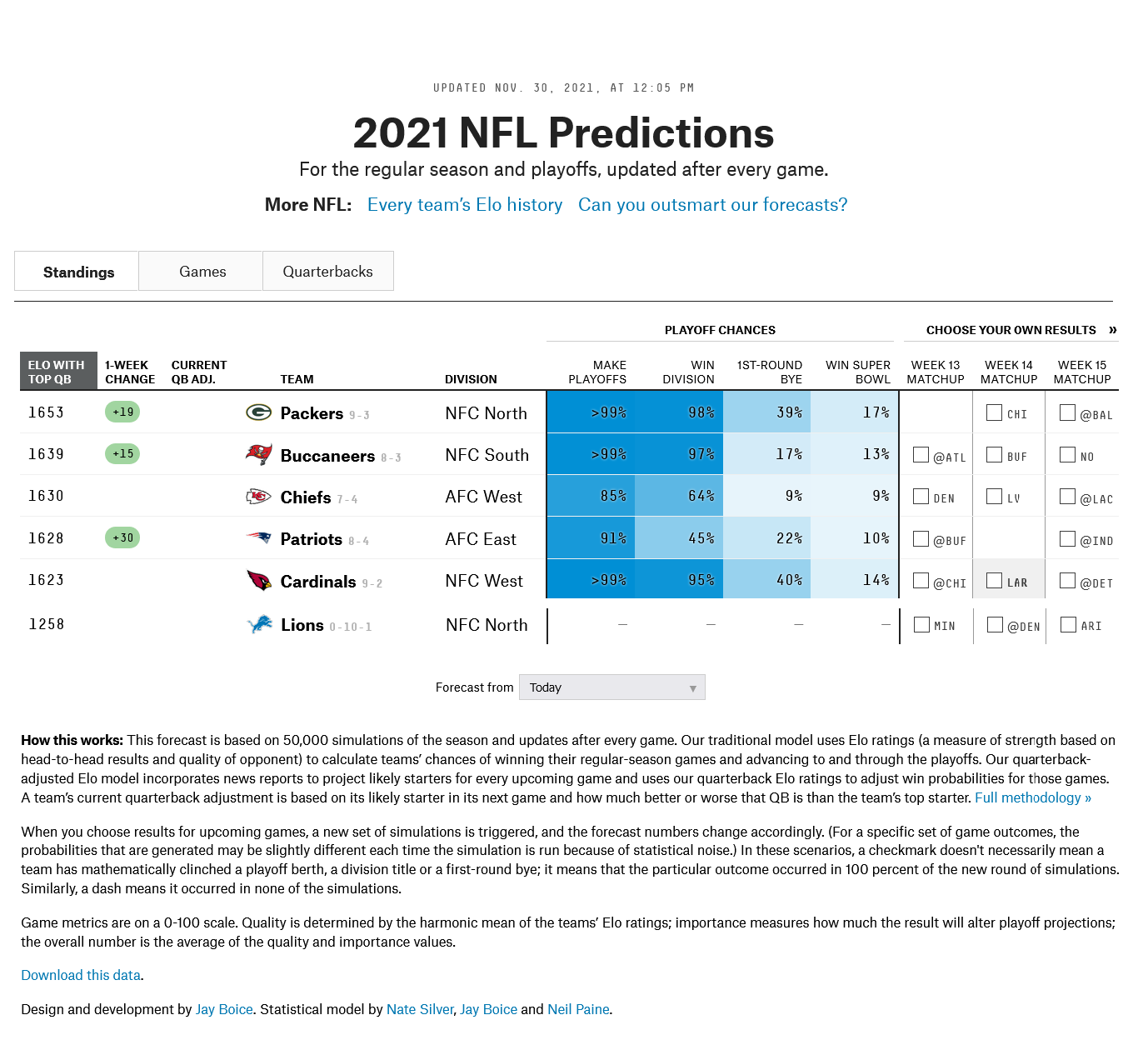
This is visualized in the graphic below:

ELO forecast probabilities for NFL season.

A drawback of this kind of approach is that errors can be propagated quickly. If (hypothetically) New England came into the season with high hopes and a high ELO rating based on past seasons but begin the season dismally, observers will be quick to update their priors. ELO, by design, will attribute the struggles more so to random perturbations then a drastic drop off in true quality and thus will be slow to pick up the signal. If the incoming season ELO ratings are true to quality, then the ELO simulated season forecast could be a reasonably proxy of the expected outcomes for a team over a season. Otherwise, an ELO type of model will be ill-equipped to account for the possibility of a poor season.

To clarify further, true ELO ratings can be easily mis-calibrated due to changes of teams year over year or within season. The assumption of the ELO rating system is that player’s are mostly true to their ELO rating if its been established with enough games. The changes in rating are mostly assumed to be due to chance and not changes in underlying skill, which is likely more true in chess than in an NFL season

However, a benefit of this kind of methodology is how easy it is to adjust. The ELO forecasts can be adjusted weekly conditioning on actual results! If New England starts the season off poorly, their ELO will reflect those changes and then the season’s simulations will adapt accordingly. ELO rolls over game to game and year over year, so it may not pick up on team quality changes as quick as an observer of the game may. This may be a feature and a bug, as it does not over-correct quickly to teams falling off after a great season nor will it be overjoyed by a bad team showing marked improvement within a year (both relatively unlikely events). In fact, as we saw above the probability of the best team winning a home game against the worst team was 88.5%4.

4 Oddly, on December 8, 2024, the best ELO team (the Philadelphia Eagles) beat the worst ELO team (the Carolina Panthers) in a very close game that was a dropped pass away from the Eagles losing. The data we use were pulled December 7, 2024, so this was a bizarre coincidence.

5 If anyone can recreate this figure (the javascript portion), they will get many bonus points.

6 Save the margin of victory adjustment. The margin of victory is estimated deterministically as \(\frac{\text{ELO}_{A}-\text{ELO}_{B}}{25}\), which then propagates and updates future ELO ratings through the following way: The win probability is also determined from an equation that we saw above. Whether a not a team wins is stochastically determined through a draw from a normal random variable centered around the estimated margin of victory (this is a number between \(-\infty\) and \(\infty\)). This is thrown through a probit procedure: a 1 if the number is positive, 0 if negative. Finally, the shift in ELO is a function of whether or not the team won minus its win probability, with that value multiplied by draw from the normal variable divided by the initial elo.

7 The ELO comparison really isn’t that great after all. It says nothing about matchups, weather (sorry Miami in the frigid air), injuries, tanking, etc. and thus is only so good.

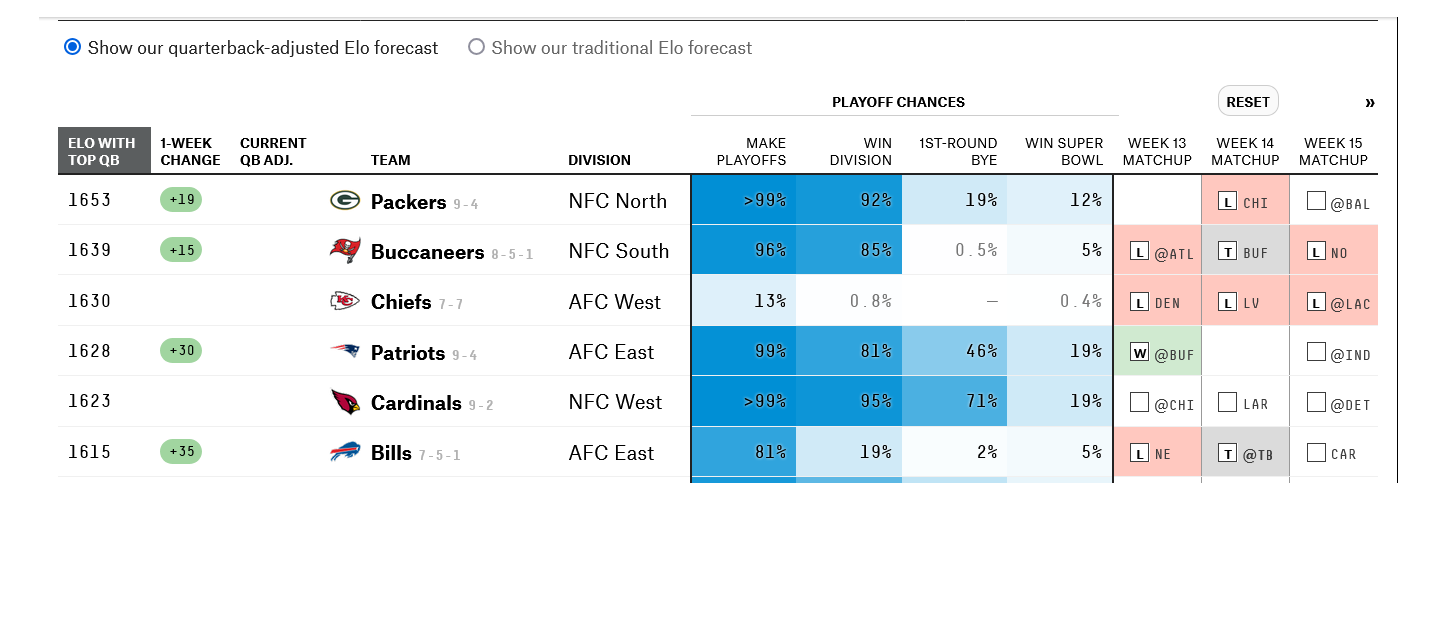
The figure below is really cool5. The website gave users the possibility to assign outcomes to events, like GB losing to CHI in week 14. Then the ELO adjusts accordingly6 and the simulations run with that outcome as a guarantee versus a Monte Carlo sample from a probability distribution. If someone has insider knowledge or a really strong feeling the mathematical model is missing something in the matchup7, and are confident enough to declare a 100% chance of a victory, then go for it. Additionally, if they are hopeful fans of a 5-7 team, they can use it to try and make their team’s odds of a playoff berth as likely as possible. The New York Times Upshot has a similar model and graphic, though it is paywalled.

Example of how easy it is to adjust to actual results or qualitative inputs.

12.5.1 ELO forecasting pro/con list

Some of these pros/cons are due more to the nature of forecasting in general and some are specific to ELO. We have already discussed some sprinkled throughout the chapter, but will summarize them here.

This ELO approach should remind you a bit of the simulation chapter, in particular the stochastic processes section. There are similarities in that outcomes are determined stochastically and propagated throughout time. On the upside, as we mentioned, this modeling paradigm can easily adapt to user inputs and changes to the system dynamically. Additionally, the entire league’s situation evolves concurrently. If a simulation suggests a certain team loses multiple games, then other teams playing that team later will have an “easier” schedule in their simulated trials. ELO also seems like a reasonable metric to assess team quality that (in part due to carrying over season over season) stabilizes quickly (see fangraphs blog on Cronbach’s alpha). Baseball prospectus’s Jonathon Judge writes an interesting article on how in practice metrics gain value by being “descriptive”, “reliable”, or “predictive”. Having all three would be really nice, and at least for football, the ELO comparison kind of does.

On the flipside, we’d be remiss not to mention the pitfalls of this approach. For one, it doesn’t work remarkably well, adding no value over betting markets. Anecdotally, pre-season simulations tend to cluster around many teams being average and fail to predict very good (+13 wins) or very bad (<3 win teams). ELO ratings are a simple metric that fail to capture the intricacies of the game and specific matchups. Even if they did, forecasting out a whole season is a folly; so much can and will change in unpredictable ways. ELO ratings also (for better or worse) weigh past seasons strongly, meaning they are slow to detect quick changes in team quality. Forecasters can try and account for this by including “QB” adjustments or other heuristics like that, but then a lot more assumptions were added to what is designed to be a very simple model. While perhaps useful as a predictive model for week-to-week predictions, forecasting out a whole season by studying the simulated outcomes of many Monte Carlo runs can run into issues quickly for the reasons discussed.

The interpretation of ELO is also a little goofy. If your team beats a better team, the implication is not that your team gets better and the team you beat gets worse. Differences in ELO before and after a game are probably better understood as a calibration of a teams ELO to closer match a team’s true quality then week over week improvements/regressions. As we have seen, ELO is generally slow to calibrate when true quality and current ELO differ. In American football, this is a real problem. ELO as a quality proxy is to slow to adjust when the the current rating isnt well calibrated. It is also fairly common for teams to improve/degrade rapidly in a short amount of time, compounding the issue.

12.5.2 NFL seedR simulations

The NFLseedR package provides a nice forum to simulate from NFL games using an ELO approach. The hardest parts of this type of modeling are the curation of data, cleaning of that data, and displaying it effectively. This package provides the data in an easily accessible format while making it easy to customize. We will show a quick example just to show how to simulate using this model. We borrow the vignette (replicating the code) from nflseedR which codes the ELO projection system. The data for NFL ELO ratings are from NF ELO app and describe the ELO ratings of NFL teams as of December 7, 2024. Information also includes color codes of teams and a link to their logos, which could create really cool tables or graphs.

Click here for full code
options(warn=-1)
suppressMessages(library(nflseedR))
suppressMessages(library(dplyr))

nflelo_data <- read.csv(paste0(here::here(),
                              "/data/nfelo-power-rankings-dec7-2024.csv"))


elo_model <- function(teams, games, week_num,  ...) {


  # round out (away from zero)
  # this way the simulator never simulates a tie
  # the simulator will still allow ties to be simulated if you want
  # ... but not on playoff games
  round_out <- function(x) {
    x[!is.na(x) & x < 0] <- floor(x[!is.na(x) & x < 0])
    x[!is.na(x) & x > 0] <- ceiling(x[!is.na(x) & x > 0])
    return(x)
  }
  # we're going to store elo as a new columns in the teams data
  # it won't start off there of course, so we need to determine it
  # from our arguments
  if (!("elo" %in% colnames(teams))) {
    args <- list(...)
    if ("elo" %in% names(args)) {
      # pull the elo info from custom arguments
      teams <- teams %>%
        dplyr::inner_join(args$elo %>% dplyr::select(team, elo), by = c("team" = "team"))

       } else {
      # error with a friendly error message if no elo data is passed in
      stop("Pass in a tibble `elo` as an argument to `simulate_nfl()`")
    }
  }

  
  # repeat for week_num
    if (!("week_val" %in% colnames(teams))) {
    args <- list(...)
    if ("week_val" %in% names(args)) {
      # pull the week_val info from custom arguments

   teams <-  teams %>%
        dplyr::inner_join(args$week_val %>% dplyr::select(team, week_val), by = c("team" = "team"))

       } else {
      # error with a friendly error message if no elo data is passed in
      stop("Pass in a tibble `week_num` as an argument to `simulate_nfl()`")
    }
    }
  # only look at the second copy (the updated simulation data)
    teams_temp  = teams %>%
      dplyr::filter(week_val %in% max(week_val))


  # isolate the ratings data by sim and by team only
  # we will want to join to the games data later and don't want excess columns
  ratings <- teams_temp %>% dplyr::select(sim, team, elo)

  # simulate game outcomes
  games <- games %>%
    # add in the away team's elo to the game data
    # note we join on both `sim` and the team
    # always join on `sim` to make sure each sim cares about only its data
    dplyr::inner_join(ratings, by = c("sim" = "sim", "away_team" = "team")) %>%
    dplyr::rename(away_elo = elo) %>%
    # repeat for the home team as well
    dplyr::inner_join(ratings, by = c("sim" = "sim", "home_team" = "team")) %>%
    dplyr::rename(home_elo = elo) %>%
    dplyr::mutate(
      # calculate the elo difference
      elo_diff = home_elo - away_elo,
      # add in a small HFA amount if played at home
      elo_diff = elo_diff + ifelse(location == "Home", 20, 0),
      # make an adjustment for rest
      elo_diff = elo_diff + (home_rest - away_rest) / 7 * 25,
      # playoff games swing elo more
      elo_diff = elo_diff * ifelse(game_type == "REG", 1, 1.2),
      # from elo, we calculate the home team's win percentage
      wp = 1 / (10^(-elo_diff / 400) + 1),
      # we also can calculate the estimate (mean points home team wins by)
      estimate = elo_diff / 25,
      result = dplyr::case_when(
        # !!! ALWAYS DO THIS NEXT LINE IN YOUR `result` CHANGES !!!
        # you have to make sure you're only changing unfinished games in current week
        # if you don't do this, it will usually error out on a friendly error message
        is.na(result) & week == week_num ~ 
          as.integer(round_out(rnorm(n(), estimate, 13))),
        # if not this week or known result, leave as-is
        TRUE ~ as.integer(result)
      ),
      # simplify to 1 = win, 0 = loss, 0.5 = tie to help calculate elo shift
      outcome = dplyr::case_when(
        is.na(result) ~ NA_real_,
        result > 0 ~ 1,
        result < 0 ~ 0,
        TRUE ~ 0.5
      ),
      # calculate the amount to adjust home team's elo by
      elo_input = dplyr::case_when(
        is.na(result) ~ NA_real_,
        result > 0 ~ elo_diff * 0.001 + 2.2,
        result < 0 ~ -elo_diff * 0.001 + 2.2,
        TRUE ~ 1.0,
      ),
      elo_mult = log(pmax(abs(result), 1) + 1.0) * 2.2 / elo_input,
      elo_shift = 20 * elo_mult * (outcome - wp)
    ) %>%
    # we don't want these columns in `games` any more
    # remove any columns you don't need when you're done
    # otherwise the next week they'll get joined as `col.x` and `col.y`
    # which will almost certainly break your script
    dplyr::select(
      -away_elo, -home_elo, -elo_diff, -wp, -estimate,
      -outcome, -elo_input, -elo_mult
    )
  # apply elo shifts
  teams_temp <- teams_temp %>%
    # join games results from this week to away teams (within same sim!)
    # note this is a LEFT join, we don't want to remove any teams rows
    dplyr::left_join(games %>%
        dplyr::filter(week == week_num) %>%
        dplyr::select(sim, away_team, elo_shift),
      by = c("sim" = "sim", "team" = "away_team")
    ) %>%
    # away team's elo gets subtracted by elo amount
    # if the team wasn't an away team, do nothing
    dplyr::mutate(elo = elo - ifelse(!is.na(elo_shift), elo_shift, 0)) %>%
    # we don't want to keep `elo_shift` in `teams` either, remove it
    dplyr::select(-elo_shift) %>%
    # repeat the above except now do it for the home team
    dplyr::left_join(games %>%
        dplyr::filter(week == week_num) %>%
        dplyr::select(sim, home_team, elo_shift),
      by = c("sim" = "sim", "team" = "home_team")
    ) %>%
    # note that a team on a bye will have `elo_shift` as NA for both joins
    # this means it won't change, which is what we want
    dplyr::mutate(elo = elo + ifelse(!is.na(elo_shift), elo_shift, 0)) %>%
    dplyr::select(-elo_shift)
  
  # we need to keep `elo_shift` out of `games` too and we're done with it
  games <- games %>%
    dplyr::select(-elo_shift)

  # Count the number of rows
  dim_teams = nrow(teams_temp)
  # Make teams a copy of teams_temp
  teams = teams_temp
  write.csv(teams_temp, 
              paste0(here::here(), '/data/ELO_sims_week_', teams_temp$week_val[1],
                     '.csv'), 
              row.names=F)

  teams_temp$week_val = teams_temp$week_val+1
  # combine the current week and teams_temp for the updated data
  #teams = rbind( teams, teams_temp)

  
  # return the updated teams and games information
  # note that `teams` will now have an updated `elo` column which will
  # be used for the next week's games
  # note that starting `elo` values are the same per-team... 
  # ... but after that will differ per sim depending on that sim's results
  return(list(teams = teams_temp, games = games, week_num = week_num))
}


initial_elo <- tibble::tibble(
  team = nflelo_data$team,
  elo = nflelo_data$nfelo)
initial_week <- 
  tibble::tibble(
  team = nflelo_data$team,
  week_val = rep(1, length(nflelo_data$team)))


test <- simulate_nfl(
  nfl_season = 2024,
  process_games = elo_model,
  elo = initial_elo,
  week_val = initial_week,
  fresh_season = TRUE,
  simulations = 25, 
  test_week = 8
)
ℹ 08:29:48 | Loading games data
ℹ 08:29:49 | Beginning simulation of 25 seasons in 1 round
ℹ 08:29:53 | Aborting and returning your `process_games` function's results
from Week 8
Click here for full code
# Look at overall league
DT::datatable(test$overall)

We can look at Detroit’s game by game simulations:

Click here for full code
# Look at Detroit's first 10 simulated full seasons, all their games
DT::datatable(test$games %>%
  filter(sim %in% seq(from=1,to=10)) %>%
  filter(away_team == "DET" | home_team == "DET"))

We can also look at the time series of their ELO seasons through 8 games. To do this (without editing the source code of the “simulate_nfl” function, we had to manually save each team summary data frame to a csv and then read it in. This is because the “simulate_nfl” function only allows you to pass in the current weeks simulations to the next, and does not store the outcomes for the teams per week unless you run the whole season. In that case, it overrides what you return in your function and instead defaults to showing season Wins/losses, playoff probabilities, and expected draft position.

Click here for full code
suppressMessages(library(NatParksPalettes))
week_k_elo = lapply(1:8, function(k)
  read.csv(paste0(here::here(), '/data/ELO_sims_week_',k,'.csv')))
pal <- natparks.pals("Acadia", n=32)
pal <- natparks.pals('Yosemite', n=32)
acadia_sub <- pal[c(1:12,20:32)]

combined_elo = do.call('rbind', c(week_k_elo))
combined_elo$elo = round(combined_elo$elo,0)
ggplotly(
  combined_elo %>%
  dplyr::filter(team %in% 'LAC')%>%
  ggplot(aes(x=week_val, y=elo, group=sim))+

    geom_path(aes(color = sim), #arrow = arrow(),  
              alpha=1, 
            lwd=0.65)+
      scale_color_gradient(name='Which simulated season', 
                              low = "#abdaf7",
                          
                          high = "#073d6d")+
      geom_point(size = 1.25, color = '#007BC7')+##334c57', alpha=0.75)+
    stat_summary(aes(x=week_val,
                y=elo, group=F),fun = "mean",
                     colour = '#ffc20e', 
                lwd=1.5,alpha=0.90, geom = "line", lty=5)+
  theme_minimal()+ylab('ELO')+xlab('Week number')+ggtitle('Chargers season ELO ratings per simulation')+
      theme(plot.title = element_text(hjust = 0.5))+
    theme(legend.position="none")
)

This is fun. Not an incredibly useful forecasting tool (as it doesn’t have a tremendous empirically proven predictive past nor does it account for important situational detail) but a nice and relatively “simple” framework to easily update beliefs if you see fit. Now, we edit the simulator (following this vignette almost verbatim) such that the Detroit Lions always win and that the Carolina Panthers always lose. This is encoded by making the win probability function “wp” an ifelse statement. Otherwise, use the equation above from the fivethirtyeight site. The margin of victory is simply estimated as the ELO difference divided by 25. We also edit “outcome” accordingly: If the best team plays (DET), code the result as a win. If the worst team plays (CAR), code a negative number. Otherwise, draw a random normal number (yay Monte Carlo!) from the ELO difference between the two teams divided by 25 and with standard deviation 13. We then use a probit link to make a negative outcome a loss, and a positive a win.

Click here for full code
elo_model_edit <- function(teams, games, week_num, ...) {


  # arguments
  args <- list(...)
  best <- ""
  worst <- ""
  
  # best team?
  if ("best" %in% names(args)) {
    best <- args$best
  }
  
  # worst team?
  if ("worst" %in% names(args)) {
    worst <- args$worst
  }
  # round out (away from zero)
  # this way the simulator never simulates a tie
  # the simulator will still allow ties to be simulated if you want
  # ... but not on playoff games
  round_out <- function(x) {
    x[!is.na(x) & x < 0] <- floor(x[!is.na(x) & x < 0])
    x[!is.na(x) & x > 0] <- ceiling(x[!is.na(x) & x > 0])
    return(x)
  }

  # we're going to store elo as a new columns in the teams data
  # it won't start off there of course, so we need to determine it
  # from our arguments
  if (!("elo" %in% colnames(teams))) {
    args <- list(...)
    if ("elo" %in% names(args)) {
      # pull the elo info from custom arguments
      teams <- teams %>%
        dplyr::inner_join(args$elo %>% dplyr::select(team, elo), by = c("team" = "team"))
    } else {
      # error with a friendly error message if no elo data is passed in
      stop("Pass in a tibble `elo` as an argument to `simulate_nfl()`")
    }
  }

  # isolate the ratings data by sim and by team only
  # we will want to join to the games data later and don't want excess columns
  ratings <- teams %>% dplyr::select(sim, team, elo)

  # simulate game outcomes
  games <- games %>%
    # add in the away team's elo to the game data
    # note we join on both `sim` and the team
    # always join on `sim` to make sure each sim cares about only its data
    dplyr::inner_join(ratings, by = c("sim" = "sim", "away_team" = "team")) %>%
    dplyr::rename(away_elo = elo) %>%
    # repeat for the home team as well
    dplyr::inner_join(ratings, by = c("sim" = "sim", "home_team" = "team")) %>%
    dplyr::rename(home_elo = elo) %>%
    dplyr::mutate(
      # calculate the elo difference
      elo_diff = home_elo - away_elo,
      # add in a small HFA amount if played at home
      elo_diff = elo_diff + ifelse(location == "Home", 20, 0),
      # make an adjustment for rest
      elo_diff = elo_diff + (home_rest - away_rest) / 7 * 25,
      # playoff games swing elo more
      elo_diff = elo_diff * ifelse(game_type == "REG", 1, 1.2),
      # from elo, we calculate the home team's win percentage
      # if BEST, make 1 if BEST is away make 0
      # opposite for worst team
      wp = ifelse(away_team == best, 0, 
              ifelse(home_team == best,1, 
                ifelse(away_team == worst, 1, 
                   ifelse(home_team == worst, 0, 
                      1 / (10^(-elo_diff / 400) + 1)    )))),
            
      #wp = 1 / (10^(-elo_diff / 400) + 1),
      # we also can calculate the estimate (mean points home team wins by)
      estimate = elo_diff / 25,
      result = dplyr::case_when(
        # !!! ALWAYS DO THIS NEXT LINE IN YOUR `result` CHANGES !!!
        # you have to make sure you're only changing unfinished games in current week
        # if you don't do this, it will usually error out on a friendly error message
        # Also edit the result accordingly
        # if best team plays, make a positive number, worst is negative
        # otherwise, draw a random normal number from the ELO difference between the two 
        # teams divided by 25 and with standard deviation 13.  Use a probit link to make negative a loss, positive a win.
        is.na(result) & week == week_num ~ 
  #        ifelse(away_team == best, -1, 
  #            ifelse(home_team == best,1, 
  #              ifelse(away_team == worst, 1, 
  #                 ifelse(home_team == worst, -1, 
                       as.integer(round_out(rnorm(n(), estimate, 13))),   
  #                     )))),

        # if not this week or known result, leave as-is
        TRUE ~ as.integer(result)
      ),
      # simplify to 1 = win, 0 = loss, 0.5 = tie to help calculate elo shift
      outcome = dplyr::case_when(
        is.na(result) ~ NA_real_,
        # Best and worst teams always win
        home_team == best ~ 1, 
        away_team == best ~ 0,
        home_team == worst  ~ 0 , 
        away_team == worst  ~ 1 ,
        result > 0 ~ 1,
        result < 0 ~ 0,
        TRUE ~ 0.5
      ),
      # calculate the amount to adjust home team's elo by
      elo_input = dplyr::case_when(
        is.na(result) ~ NA_real_,
        result > 0 ~ elo_diff * 0.001 + 2.2,
        result < 0 ~ -elo_diff * 0.001 + 2.2,
        TRUE ~ 1.0,
      ),
      elo_mult = log(pmax(abs(result), 1) + 1.0) * 2.2 / elo_input,
      elo_shift = 20 * elo_mult * (outcome - wp)
    ) %>%
    # we don't want these columns in `games` any more
    # remove any columns you don't need when you're done
    # otherwise the next week they'll get joined as `col.x` and `col.y`
    # which will almost certainly break your script
    dplyr::select(
      -away_elo, -home_elo, -elo_diff, -wp, -estimate,
      -outcome, -elo_input, -elo_mult
    )

  # apply elo shifts
  teams <- teams %>%
    # join games results from this week to away teams (within same sim!)
    # note this is a LEFT join, we don't want to remove any teams rows
    dplyr::left_join(games %>%
        dplyr::filter(week == week_num) %>%
        dplyr::select(sim, away_team, elo_shift),
      by = c("sim" = "sim", "team" = "away_team")
    ) %>%
    # away team's elo gets subtracted by elo amount
    # if the team wasn't an away team, do nothing
    dplyr::mutate(elo = elo - ifelse(!is.na(elo_shift), elo_shift, 0)) %>%
    # we don't want to keep `elo_shift` in `teams` either, remove it
    dplyr::select(-elo_shift) %>%
    # repeat the above except now do it for the home team
    dplyr::left_join(games %>%
        dplyr::filter(week == week_num) %>%
        dplyr::select(sim, home_team, elo_shift),
      by = c("sim" = "sim", "team" = "home_team")
    ) %>%
    # note that a team on a bye will have `elo_shift` as NA for both joins
    # this means it won't change, which is what we want
    dplyr::mutate(elo = elo + ifelse(!is.na(elo_shift), elo_shift, 0)) %>%
    dplyr::select(-elo_shift)

  # we need to keep `elo_shift` out of `games` too and we're done with it
  games <- games %>%
    dplyr::select(-elo_shift)

  # return the updated teams and games information
  # note that `teams` will now have an updated `elo` column which will
  # be used for the next week's games
  # note that starting `elo` values are the same per-team... 
  # ... but after that will differ per sim depending on that sim's results
  return(list(teams = teams, games = games))
}


sims3 <- simulate_nfl(
  nfl_season = 2024,
  process_games = elo_model_edit, 
  elo = initial_elo,
  fresh_season = TRUE, 
  simulations = 25,
  best = "DET", 
  worst = "CAR",
  sim_include = 'REG'
)
ℹ 08:29:54 | Loading games data
ℹ 08:29:54 | Beginning simulation of 25 seasons in 1 round
ℹ 08:30:02 | Combining simulation data
ℹ 08:30:02 | Aggregating across simulations
ℹ 08:30:02 | DONE!
Click here for full code
DT::datatable(sims3$overall)

So this is interesting. Play around with the “simulate_nfl” function. In particular, if you want to simulate conditional on the current state of the season, set “fresh_season=FALSE”.

Assignment (12.3)
  1. BONUS: Try and recreate the fivethirtyeight checkbox graphic with some ELO simulations.
  2. BONUS: If you can find the data, try and create a BART based match-up model. That is, try and predict the outcome of a game, a classification problem to determine \(\Pr(\text{Team A beats team B})\). You can incorporate things like ELO for team A, ELO for team B, temperature at kickoff, QB season rating, offensive/defensive DVOA for each team, offense/defense schemes, and many more. The data curation here would be a LOT of work, but it would be cool to train on those covariates. Since BART is a Bayesian model, you can sample from the posterior probabilities of \(\Pr(\text{Team A beats team B})\), feed those into the NFLseedR simulator, and propagate the season forward, adjusting the ELO ratings based on the previous victories/losses for teams simulated from the BART posteriors as input probabilities. However, this would probably be more useful week to week then over a season as things like the weather aren’t really known until a couple days before. Nonetheless, have a try!

12.6 Time series forecasts

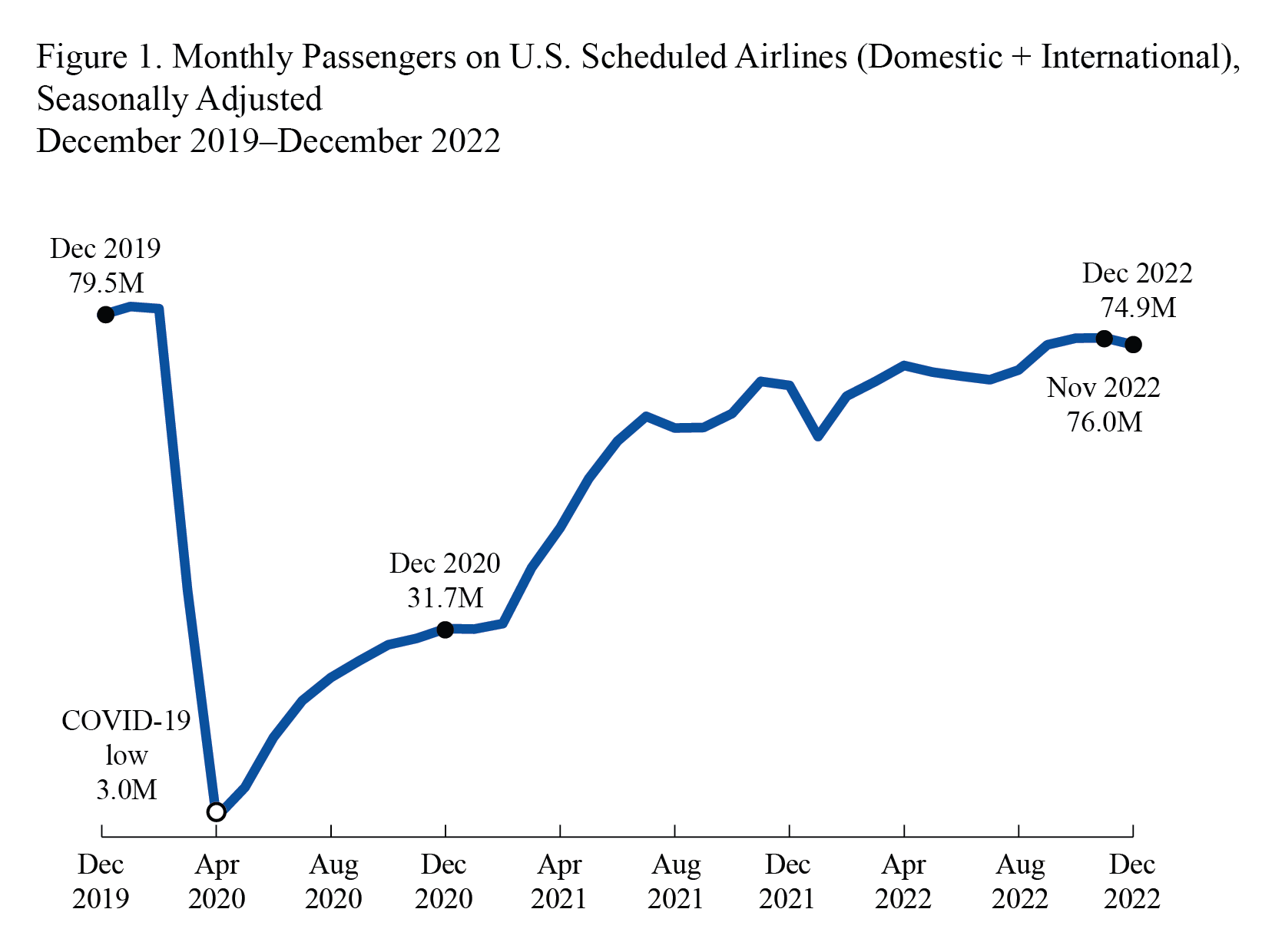
We will not provide much here about time series, but will show a data example using airline traffic data to illustrate the difficulty in practice of fitting two popular time series models, mainly ARIMA and Prophet models.

12.6.1 Prophet model

Click here for full code
options(warn=-1)
suppressMessages(library(prophet))
suppressMessages(library(tidyverse))
suppressMessages(library(dplyr))
suppressMessages(library(forecast))
#https://www.zumper.com/rent-research/tempe-az
air_travel = read.csv(paste0(here::here(), '/data/travel_2020.csv'))
# select 2019 and 2020
air_travel = air_travel %>%
  dplyr::select(Date, X2020.Travel, X2019.Travel)%>%
  dplyr::filter(Date<as.Date('2020-12-31'))

colnames(air_travel) = c('Date', 'travel_2020', 'travel_2019')
# melt from wide to long data, manually
new_dates = sub('\\d{4}(?=-)', '2019', air_travel$Date, perl=TRUE)
air_travel = rbind(data.frame(Date = air_travel$Date, travel = air_travel$travel_2020), 
      data.frame(Date = new_dates, travel = air_travel$travel_2019))

colnames(air_travel) <- c('ds', 'y')
air_travel$ds <- as.Date(air_travel$ds)

prophet_model <- prophet(air_travel)
Disabling yearly seasonality. Run prophet with yearly.seasonality=TRUE to override this.
Disabling daily seasonality. Run prophet with daily.seasonality=TRUE to override this.
Click here for full code
future <- make_future_dataframe(prophet_model, periods = 365)
forecast <- predict(prophet_model, future)


dyplot.prophet(prophet_model, forecast)

This is an image I found online of the actual data:

2020-2022 US airline traffic

2020-2022 US airline traffic

2021 saw a rapid return in the U.S. to “normal” life after a year of pandemic restrictions, particularly after the vaccine rollout. Overall, the forecast is not bad, but we also have a lot of data that was fairly stable (before whatever happened in March 2020…)

12.6.2 ARIMA

Back in chapter 2, we discussed the troubling scenario in a regression analysis where the error terms were correlated. In chapter 3, we discussed one scenario where this may be the case, where the observations are correlated according to the “group” they belong to, for example certain regions of the U.S. may “vary together” with respect to the error terms of the observations in the region. The hierarchical model is an approach to remedy this, where we found a balance between shared variance and unique variance.

A second common violation of the “no correlated errors” assumption is in time series data. Because the observations in this case are sequential, for example a stock’s gain over time, it is common for the errors of the current day to strongly depend on the previous days errors. This is called serial correlation. The implication is that the observations depend on previous observations and problematically through unobserved variables. As we saw earlier, the dependence of the observations are fine in the case that the dependence is through the “signal” in the model that can be modeled when estimating the conditional expectation, \(E(Y\mid \mathbf{X})\). Our exposition will follow that of (Hanck et al. 2021).

  • AR: The autoregression aspect of the problem, which is essentially accounting for the “lag”. Mathematically, this refers to regressing \(Y_t\) on \(Y_{t-1}\) for an AR(1) model. For an AR(\(k\)) model, this refers to regressing \(Y_t\) on \(Y_{t-1}, Y_{t-2}, \ldots,Y_{t-k}\).
  • MA: Moving average.

As an example of the moving average, let’s consider the following data. This is Demetri’s walking data. The data from day to day are kind of noisy. In the iphone health data app, the phone will show you the total number of steps in the last week divided by 7, which is the average number of steps you took in the last 7 days. This number will be a lot smoother and a better representation of Demetri’s activity level at a moment. It is a little slower to react to changes in activity, but much less likely to overreact to daily fluctuations. The larger the number we average over, the smoother we expect the data, but the slower it is to pick up pattern changes. 7 is nice because it corresponds to a 7-day week, which is fairly ubiquitious in American life and scheduling.

For example, Demetri walks a lot more on the weekend than weekday. So a drop-off in step count between Sunday and Monday is no big deal. But a drop-off between this Monday from last Monday is more likely indicative of a pattern change. The weekly trend phenomenon that motivates the rolling 7-day average was especially noticeable during COVID, when many states reported their weekend case numbers on Monday’s, making Monday’s numbers look scary and the weekends relatively tame.

For a nice visual of Demetri & pals walking challenge, see below:

Click here for full code
options(warn=-1)
suppressMessages(library(tidyverse))
suppressMessages(library(dplyr))
suppressMessages(library(plotly))
suppressMessages(library(data.table))
boys_walk <- read.csv(paste0(here::here(), "/data/boys_walk_anon.csv"))
boys_walk = boys_walk[, 1:7]
boys_walk$Date = as.Date(boys_walk$Date, '%m/%d/%Y')
boys_walk = boys_walk %>%
dplyr::filter(as.Date(Date,  '%m/%d/%Y')>as.Date('02/22/2025', '%m/%d/%Y'))%>%
dplyr::filter(as.Date(Date,  '%m/%d/%Y')<as.Date('04/01/2025', '%m/%d/%Y'))

df = data.frame(Jeff=frollmean(boys_walk[boys_walk$Category%in%'Steps',]$A, 7),
  Demetri=frollmean(boys_walk[boys_walk$Category%in%'Steps',]$Demetri, 7),
  Riley=frollmean(boys_walk[boys_walk$Category%in%'Steps',]$C, 7),
  D=frollmean(boys_walk[boys_walk$Category%in%'Steps',]$D, 7),
  Joe=frollmean(boys_walk[boys_walk$Category%in%'Steps',]$B, 7) )

boys_walk = boys_walk %>%
  dplyr::filter(as.Date(Date,  '%m/%d/%Y')>as.Date('02/28/2025', '%m/%d/%Y'))%>%
  dplyr::filter(as.Date(Date,  '%m/%d/%Y')<as.Date('04/01/2025', '%m/%d/%Y'))
df = df %>%drop_na()
df$`Demetri actual` = boys_walk[boys_walk$Category%in%'Steps',]$Demetri


boys_walk$Demetri[boys_walk$Category%in%'Steps'] = cumsum(boys_walk$Demetri[boys_walk$Category%in%'Steps'] )
boys_walk$D[boys_walk$Category%in%'Steps']  = cumsum(boys_walk$D[boys_walk$Category%in%'Steps'] )
boys_walk$C[boys_walk$Category%in%'Steps']  = cumsum(boys_walk$C[boys_walk$Category%in%'Steps'] )
boys_walk$B[boys_walk$Category%in%'Steps']  = cumsum(boys_walk$B[boys_walk$Category%in%'Steps'] )
boys_walk$A[boys_walk$Category%in%'Steps']  = cumsum(boys_walk$A[boys_walk$Category%in%'Steps'] )


min_date= '03/29/2025'
max_date = '04/03/2025'
mid_date = '03/31/2025'


boys_walk$team1 = boys_walk$A+boys_walk$Demetri+boys_walk$C
boys_walk$team2 = boys_walk$D+boys_walk$B
boys_walk$lead = boys_walk$team2-boys_walk$team1

boys_walk$winner = ifelse(boys_walk$lead>=0, 'Frontrunners', 'Comeback kids')
boys_walk$group = ifelse(boys_walk$lead>=0, 1,0)

step_plot_team3 = boys_walk %>%
  dplyr::filter(Category %in% 'Steps')%>%
  #pivot_longer(cols=c(team1, team2))%>%
  ggplot(aes(x=Date, y=lead))+

  geom_ribbon(data=boys_walk[1:16,],
                aes(ymin=0,
                  ymax=lead
  ),
  fill='#6f95d2',
  alpha=0.57)+
  geom_ribbon(data=boys_walk[boys_walk$lead<0&boys_walk$Category
                             %in%'Steps',],
              aes(ymin=lead,
                  ymax=0
              ),
              fill='#004D40',
              alpha=0.59)+

  geom_line(lwd=1.25, alpha=0.9, col='#073d6d')+
  scale_x_date(date_breaks = "3 days", date_labels = "%m/%d/%Y")+
  scale_y_continuous(limits = c(-80000, 80000),
                     breaks = round(seq(-80000,80000, length.out = 5),2))+
  ylab('Difference in cumulative steps')+
  annotate(geom='rect', xmin=as.Date('03/07/2025','%m/%d/%Y'),
           xmax=as.Date('03/16/2025','%m/%d/%Y'),
           ymin=-30000,
           ymax=-18000,
           fill=alpha('#004D40', 0.05),
           color='#004D40', linewidth=1)+
  annotate(geom='text', x=as.Date('03/12/2025','%m/%d/%Y' ),
           y=max(-24000),
           label = 'Comeback kids',
           color='#073d6d', linewidth=1,
           hjust=1, vjust=0, lineheight=1, size=4)+


  annotate(geom='rect', xmin=as.Date('03/02/2025','%m/%d/%Y'),
           xmax=as.Date('03/08/2025','%m/%d/%Y'),
           ymin=max(boys_walk$lead, na.rm=T)-7000,
           ymax=max(boys_walk$lead,na.rm=T)+3000,
           fill=alpha('#6f95d2', 0.05), color='#6f95d2', linewidth=1)+
  annotate(geom='text', x=as.Date('03/05/2025','%m/%d/%Y' ),
           y=max(boys_walk$lead,na.rm=T)-3000,
           label = 'Frontrunners',
           color='#073d6d', linewidth=1,
           hjust=1, vjust=0, lineheight=1, size=4)+
  geom_hline(yintercept=0,
             color='#012024', alpha=0.9,
             xmin=as.Date('03-01-2025', '%m/%d/%Y') ,
             lwd=0.42)+


  theme_minimal(base_family = "NewCenturySchoolbook",
                base_size = 16)+
  theme(legend.position="none",
        axis.text.x = element_text(angle = 45, vjust = 1, hjust = 1))

ggplotly(step_plot_team3)

12.6.3 Back to business

As this is a short introduction, we will not get into the linear algebra behind the fitting procedures or the diagnostics. We will also stick to the comparably simple linear ARIMA models, which are a) the standard, and b) a little easier to be introduced to. Part of their popularity does stem from the ability to learn theoretical properties of the model, though that is true of most linear models.

Click here for full code
# get week year
air_travel$week_year = paste0(format(as.Date(air_travel$ds), "%Y"),'_', format(as.Date(air_travel$ds), "%W"))
# Take weekly average
air_travel = air_travel %>%
  group_by(week_year)%>%
  dplyr::summarise(y = mean(y, na.rm=T))

air_travel_Y <- rev(air_travel$y)


fit <- Arima(air_travel_Y, order=c(1,0,0))


checkresiduals(fit)+theme_minimal()


    Ljung-Box test

data:  Residuals from ARIMA(1,0,0) with non-zero mean
Q* = 27.939, df = 9, p-value = 0.0009766

Model df: 1.   Total lags used: 10
NULL
Click here for full code
autoplot(forecast(fit))+theme_minimal()

Okay so maybe just looking at the past week isn’t great. We seem to have a trend (trending upwards as the pandemic recovery strengthened throughout 2021), which calls for a MA term. There doesn’t seem to be super obvious seasonality, at least in part due to the unusual dip in 2020 caused by the pandemic8. We will use the auto-arima function from the forecast package, which will try different values for the “order”, which varies the lag, MA, and I terms. With the terms from the auto arima, we plug them into the Base R Arima function, which has better diagnostic plots (in our opinion).

8 Yes, we’re confident in assigning causality to the reduction in travel to the pandemic

Click here for full code
fit_auto = auto.arima(air_travel_Y)

fit = Arima(air_travel_Y, order=arimaorder(fit_auto))

checkresiduals(fit)+theme_minimal()


    Ljung-Box test

data:  Residuals from ARIMA(1,1,0)
Q* = 5.3261, df = 9, p-value = 0.805

Model df: 1.   Total lags used: 10
NULL
Click here for full code
autoplot(forecast(fit))+theme_minimal()

12.6.4 Curve registration?

Sam

The European beer data could be interesting here?

data source from University of Arizona

Click here for full code
# Maricopa weather 2023
suppressMessages(library(plotly))

df_list = c()#matrix(NA, nrow=366*12, ncol=29)
val = 1
# 2019-2023
for (i in c('03', '04','05','06', 20, 21, 22,23)){#seq(from=14, to=23)){
  
 df_list[[val]] = read.csv(url(paste0('https://azmet.arizona.edu/azmet/data/06', i,'rd.txt')),header=FALSE)


colnames(df_list[[val]]) =  c('Year', 'Day of Year', 'Station Number', 'Air Temp - Max',
'Air Temp - Min', 'Air Temp - Mean', 'Rel. Humidity - Max',
'Rel. Humidity - Min', 'Rel. Humidity - Mean', 
'Vapor Pressure Deficit - Mean', 'Solar Radiation - Total',
'Precipitation - Total', '4" Soil Temperature - Max','4" Soil Temperature - Min',
'4" Soil Temperature - Mean',
'20" Soil Temperature - Max','20" Soil Temperature - Min',
'20" Soil Temperature - Mean',
'Wind Speed - Mean', 'Wind Vector Magnitude', 
'Wind Vector Direction', 'Wind Direction Standard Deviation','Max Wind Speed', 'Heat Units (86/55F)',  'Reference Evapotranspiration - Original AZMET', 'Reference Evapotranspiration - Original Penman-Monteith','Actual Vapor Pressure', 'Dewpoint, Daily Mean')
# convert dewpoint to fahreinheit
df_list[[val]][,'Dewpoint, Daily Mean'] = 1.8*df_list[[val]][,'Dewpoint, Daily Mean'] +32
df_list[[val]][,'Air Temp - Max'] = 1.8*df_list[[val]][,'Air Temp - Max'] +32
df_list[[val]][,'Air Temp - Min'] = 1.8*df_list[[val]][,'Air Temp - Min'] +32
 df_list[[val]]$year = rep(paste0('20', i), nrow(df_list[[val]]))
  val = val+1
}
df_total = do.call('rbind', df_list)


color_vals = NatParksPalettes::natparks.pals("Acadia", 10)[c(1,2,3,4,7,8,9,10)]

# Dewpoint is fun to look at

ggplotly(df_total %>%
  mutate_if(is.numeric, round, 3)%>%
  ggplot(aes(x=`Day of Year`, y=`Air Temp - Min`, color=year, linetype=year))+
    #### Uncomment this line to see the individual data points
  #geom_point(size=.10)+
  geom_smooth(se=F, lwd=.75)+scale_color_manual(values=color_vals)+
    scale_linetype_manual(values=c('solid','solid','solid','solid','dashed','dashed','dashed', 'dashed'))+
    ggtitle('Loess smoothed fit of daily min temps in Phoenix area')+
    theme_minimal())
`geom_smooth()` using method = 'loess' and formula = 'y ~ x'

This data was more of an example to show changes over a the time of year (AZ seems to have basically have two seasons with respect to temperatures) and how summer nighttime lows are trending up over the last 20 years or so. Making the recent 3 years dashed is a choice from a data visualization perspective. In a sense, it brings the eye to a trend we noticed. However, it also immediately suggests where the user should look. Here, the trend seems obvious given what we know about the urban heat island effect, but in general we’d be cautious to draw conclusions about two groups with only 4 observations in each.

Assignment (12.4)
  1. Using the Arizona weather, model the data using a few different methods that we have discussed throughout the course. Run the loop for all the years from 2003-2023 to have more data.
  • Fit a multivariate normal with the empirical distribution and generate some “fake” data for next year to get a confidence range for next years trend of temperatures.

  • Do the same, but with a Gaussian mixture model as your generative model. This might make more sense as we are confident nighttime low temperatures are increasing, particularly in the summer.

  • Using the noisy data, fit a BART model with day of year and a random effect for the year, following this stochtree vignette. Below, we use stochtree with a timezone indicator by year, with the inputs being the day of year and the year indicator columns. Compare the random effect BART to the “vanilla” BART implementation we show below.  

  • If you are really ambitious, try and model the dewpoint and daily low temperature together. Do so with the multivariate normal procedure from chapter 8, but with the data “stacked together”. For example, for the sample mean, this can be done by stacking as follows:\(\mu = \{\hat{\mu}_{t=1, \text{temp}}, \hat{\mu}_{t=365, \text{temp}}, \hat{\mu}_{t=1, \text{dewpoint}}, \hat{\mu}_{t=365, \text{dewpoint}}\}\)

    where \(\hat{\mu}\) is the average across the 20 years for that day. The same can be done to get \(\Sigma\).

For the BART assignment, we present the simpler approach that does not involve coding in the random effect (which is a good tutorial to stochtree). While the noise level does not seem to be too high, there is certainly noticeable variation across the years for mean daily temperature (albeit less than most U.S. climates). For this reason, we encourage more shallow trees by changing the tree growing prior by having \(\alpha:0.95\rightarrow 0.5\) and \(\beta:2\rightarrow 3\)9. The goal is to encourage BART to build smaller trees, unless the data (the likelihood updates of the Bayesian crank) strongly suggest otherwise. Further, we build 200 trees, which is on the higher end, to encourage a smoother fit that we’d expect for the general trend of temperature in Arizona.

9 \(\left(\frac{\alpha}{1+\text{node depth}}\right)^\beta\)

Click here for full code
options(warn=-1)
suppressMessages(library(stochtree))
suppressMessages(library(fastDummies))
# Make year a dummy variable

df_total = dummy_cols(df_total,
                 select_columns = c('year'))

set.seed(12024)
# Split data into test and train sets
test_set_pct <- 0.6
n = nrow(df_total)
n_test <- round(test_set_pct*n)
n_train <- n - n_test
test_inds <- sort(sample(1:n, n_test, replace = FALSE))
train_inds <- (1:n)[!((1:n) %in% test_inds)]
df_total$post_2019 = ifelse(df_total$Year>2019, '#080E4B', '#D4A017')

X_test <- as.data.frame(df_total[test_inds, c('year_2003', 'year_2004', 'year_2005', 'year_2006', 'year_2020', 'year_2021', 'year_2022', 'year_2023', 'Day of Year')])
X_train <- as.data.frame(df_total[train_inds, c('year_2003', 'year_2004', 'year_2005', 'year_2006', 'year_2020', 'year_2021', 'year_2022', 'year_2023', 'Day of Year')])
y = df_total$`Air Temp - Min`
y_test <- y[test_inds]
y_train <- y[train_inds]
num_gfr <- 10
num_burnin <- 0
num_mcmc <- 100
num_samples <- num_gfr + num_burnin + num_mcmc
bart_model_warmstart <- stochtree::bart(
    X_train = X_train, y_train = y_train, X_test = X_test, 
    
   
    num_gfr = num_gfr, num_burnin = num_burnin,
    num_mcmc = num_mcmc, 
    # prefer larger trees
     mean_forest_params = list(num_trees=200,alpha=0.975, beta = 1.25)
)

plot(y_test,rowMeans(bart_model_warmstart$y_hat_test),col=df_total[test_inds, 'post_2019'], pch=16, xlab='Test set', ylab='Test predictions', cex=0.82)
abline(a=0, b=1, col='#55AD89', lwd=4)
legend("topleft", legend = c('2020-2023', '2003-2006'), col = c('#080E4B','#D4A017'), pch = 16, bty = "n")

The fit looks really good, which isn’t surprising given that the data are not super noisy in Arizona (uncomment the geom_point line in the interactive plot above to see for yourself) and the response function is pretty straightforward as a function of time. Adding the year as a feature seems to account for the added change given by the year over year change. In other words, the residuals do not paint an obvious picture that we really need the random effect model. Crudely, we color code based on the 2003-2006 observations and 2020-2023 observations. Were the random effect necessary for the BART model, as in the stochtree vignette, then we would see systematic bias of the predictions for the different groups.

For fun, we look at the predictions in the test set that belong to 2023.

Click here for full code
test_2023 = which(df_total[test_inds,]$Year==2023)
plot(df_total[test_inds, 'Day of Year'][df_total[test_inds,]$Year==2023],df_total[test_inds, 'Air Temp - Min'][df_total[test_inds,]$Year==2023], col='#073d6d', pch=16, xlab='Time of year', ylab='Daily Phoenix minimum temperature', main='2023')

lines(df_total[test_inds, 'Day of Year'][df_total[test_inds,]$Year==2023],rowMeans(bart_model_warmstart$y_hat_test)[test_2023], col='#d47c17', lwd=4)

12.7 Another time series forecasting approach

For this example, we call upon an old pal.

The data are from the “Average Surface Water Temperature (GLSEA)” page offered by noaa.gov. They describe annual average surface temperatures of Lake Erie over the years, collected daily. You can choose other Great Lakes to both visualize and download off their easy to use website. In this example, we take a “Gaussian Process” (GP) regression approach to tackle the time series forecast. To do so, we make the data “long”, as in instead of studying each year separately, we concatenate all the time series into one long list. From this visual, reproduced below, it is pretty clear the data are very periodic and relatively constant year over year. This guides our prior choice for the kernel: we want to use a periodic kernel as when we extrapolate we are fairly certain to expect a periodic function. If we were expecting a warming trend over time, adding on a linear kernel also might make sense.

While using Gaussian processes for forecasting sounds great, it comes with drawbacks.

  • The choice of prior here was fairly obvious, but that is rarely the case.

  • We have to fit the data to a weekly average, because Gaussian process regression becomes computationally prohibitive (runtime wise) at about 1,000 observations, which is less than 3 years of input data. Fitting the weekly average smooths the data to the point that the problem is a very easy forecasting one and likely doesn’t need the extra GP machinery. It is hard to explain to people what a GP is besides “machine learning” and while easy-ish to implement, it is not super straightforward.

Anyways, here goes. We use 2016, 2017, 2018, 2019, and 2020 data to train and predict temperatures for 2021, 2022, and 2023. Again, we are looking at the average temperatures for each of the 52 weeks in a year.

Click here for full code
import numpy as np
import pandas as pd
import warnings
import os 
from sklearn.gaussian_process import GaussianProcessRegressor
from sklearn.gaussian_process.kernels import ExpSineSquared
from sklearn.gaussian_process.kernels import RBF
from sklearn.gaussian_process.kernels import WhiteKernel, ConstantKernel
import matplotlib.pyplot as plt
os.chdir("..")
warnings.filterwarnings("ignore")
df = pd.read_csv('./quarto_bookdown/data/erie_temps.csv')

df.rename(columns={ df.columns[0]: "Date" }, inplace = True)


df['year_date'] = pd.date_range(start='2020-01-01', periods=366, freq='d')
df['month_date'] = pd.date_range(start='2020-01-01', periods=366, freq='d').strftime('%m-%d')
df['week_num'] = df['year_date'].dt.isocalendar().week


df2 = pd.melt(df, id_vars=["Date","year_date","month_date", "week_num"], var_name='Year')

df2.index.name = 'time_index'
df2.reset_index(inplace=True)
# take weekly average to make data smaller
df3 = df2.groupby([df2['Year'], df2['week_num']])['value'].mean().reset_index()

df3.reset_index(inplace=True)
# Replace NA with nearest value
# https://stackoverflow.com/questions/44102794/input-missed-values-with-mean-of-nearest-neighbors-in-column
df3.replace(to_replace=0, value=np.nan, inplace=True)
df3.interpolate(inplace=True)
# Train
df_train = df3[df3['Year'].isin([ '2016', '2017','2018','2019','2020'])]
# test on 2023
df_test = df3[df3['Year'].isin(['2021','2022','2023'])]
X_train = df_train.index.to_numpy()-df_train.index.to_numpy().min()
y_train = df_train.value
y_test = df_test.value
X_test = df_test.index.to_numpy()-df_train.index.to_numpy().min()
X_train = X_train#/max(X_test)
X_test = X_test#/max(X_test)
# Use a periodic kernel
kernel_val = 'Periodic'
kernel =  15 * ExpSineSquared(1.0, 5.0, periodicity_bounds=(35, 65)) + WhiteKernel(1e-1)
gaussian_process = GaussianProcessRegressor(kernel=kernel, n_restarts_optimizer=9)
gaussian_process.fit(X_train.reshape(-1,1), y_train)
GaussianProcessRegressor(kernel=3.87**2 * ExpSineSquared(length_scale=1, periodicity=5) + WhiteKernel(noise_level=0.1),
                         n_restarts_optimizer=9)
In a Jupyter environment, please rerun this cell to show the HTML representation or trust the notebook.
On GitHub, the HTML representation is unable to render, please try loading this page with nbviewer.org.
Click here for full code
X = np.concatenate([X_train, X_test])

# prediction

mean_prediction, std_prediction = gaussian_process.predict(X.reshape(-1,1), return_std=True)


plt.figure(figsize=(7,5))


plt.plot(X.reshape(-1,1), mean_prediction, label="Pred", color='#073d6d', linewidth=2)


plt.fill_between(
    X.ravel(),
    mean_prediction - 1.96 * std_prediction,
    mean_prediction + 1.96 * std_prediction,
    color='#55AD89',
    alpha=0.25,
    label=r"95% CI",
)
# Let's plot the mean prediction and the uncertainty region as before.
plt.scatter(x=X_train, y=y_train, label = "train",  color='#DA70D6', s=16)
plt.scatter(x=X_test, y=y_test, label = "test",  color='#d47c17', s=16)
plt.legend(loc='upper left')
plt.vlines(x=5*52, ymin=30, ymax=80, color='#8b1a1a', linewidth=2.5, linestyle = 'dashed')
plt.xlabel('Week number (from 2016-2023)')
plt.ylabel('Temperature (Fahreinheit)')
_ = plt.title("Gaussian process regression: "+kernel_val)
plt.show()

So the extrapolation looks pretty good, but that is in part because the input data are fairly repetitive and this was reflected in our choice of prior. The realizations of the periodic kernel we chose, without seeing any data, already match the shape of the data fairly well. In other words, this is a pretty easy problem.

Assignment (12.5)
  1. Play around with combining kernels together. For example, adding on a linear kernel might help capture any warming trends.

  2. Perform a similar analysis as we did above with the Phoenix temperature data. Forecast on weekly averages using a Gaussian process regression.

  3. BONUS: Try and implement a Recurrent Neural Network (RNN) for this problem. Chapter 21 of this book shows how this can be done with R’s torch implementation, although using PyTorch or Tensorflow in Python is likely a better idea.

12.8 Forecasting vs nowcasting

Forecasting and two similar but distinct topics that are often confused.

Forecasting

  • Based off of past data, how well can you predict the future?

  • The model parameters are set in stone.

  • Ex) Based on the weather from 2018 –> 2024, what will 2025 look like?

  • Ex) Your COVID model was fit from March to July. Now have it predict up until September.

  • Election predictions that are fixed before the first results come in are forecasts.


Nowcasting

  • Parameters update over time. Predictions are based upon updated parameters and incoming data.

  • State-space models are popular for nowcasting.

  • (Dukic, Lopes, and Polson 2012) present a really cool Bayesian state space SIR model for flu nowcasting. SIR parameters are updated over time as new data come rolling in, and short term forecasts of the next couple weeks of flu cases are made.

  • The New York Times election needle is a nowcast. It updates regularly throughout the night, bringing much grief and heartache.